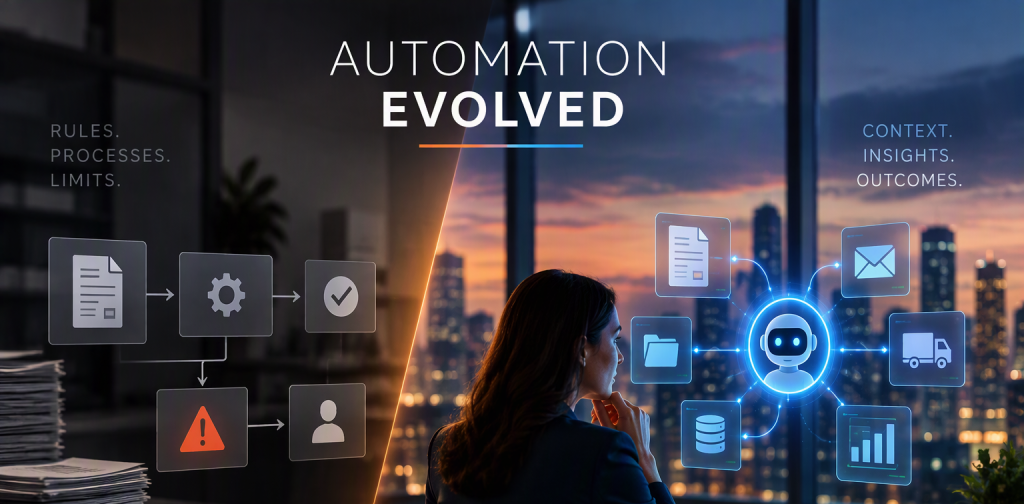
Everyone is talking about automation and AI. But automation is not new; businesses have been using it for years. So what has really changed now that AI is part of the picture? Many automated workflows still depend on people to step in whenever something unexpected happens. AI agents bring a different possibility: systems that can interpret situations, investigate exceptions, and recommend what needs attention. Making this useful in everyday business operations, however, still depends on the right business rules, integrations, and approval controls.
How We Used to Automate (and Where It Got Stuck)
For years, automation meant giving the system a list of clear instructions. If the invoice is above this amount, send it to the manager. If this field is empty, stop and ask. If the due date is tomorrow, send a reminder. It worked very well for work that is predictable, such as approvals, reminders, data entry and matching one document against another. Many finance and operations teams still depend on these instructions every single day, and rightly so.
Take a simple case in Dynamics 365 Business Central. An invoice says 120 units, but the warehouse recorded only 100. The system notices the difference and flags it. That is useful. Nobody has to compare thousands of lines by eye. But then what?
This is where the work got stuck.
The problem was found, but not solved. The system could say “something is wrong here”, but it could not say what or why. Someone still had to open the purchase order, check the receipt, search old emails and call the purchasing team to find out what went wrong. The flag was only the start of the job.
Every new situation needed a new instruction. A supplier sends a partial delivery. A price changes after a phone call. A customer asks for a different address. Each case needed its own rule. Over time the list grew longer and harder to manage, and people became afraid to touch it in case something else broke.
Information lived in many places. Part of the answer was in the system, part was in an email, and part was in a shared file or a chat message. The employee became the link between them, carrying small pieces of information from one place to another all day long.
The system could not see the bigger picture. A price difference could be a mistake. It could also be an approved change, or a leftover from an old purchase order. The system could see the difference, but not the reason behind it. And without the reason, it could not tell which case was which.
The problem became bigger at busy times, like month-end. When many exceptions arrive together, the people who handle them have very little time left for anything else. The system had done its part in a few seconds, but the real work was only starting. Teams worked late, and the most skilled people spent their hours doing detective work instead of the things they were hired to do.
Automation was good at spotting problems. It was not good at understanding them.
Then AI Walked In
An AI agent works differently from a list of instructions. Think of it as a helpful assistant that can read, look things up and think a problem through. You give it a goal, for example, “find out why this invoice does not match”, and it figures out the steps on its own. It can open the related records, read the supporting documents it is allowed to see, compare them, and come back with what it found and what it suggests.
A good way to picture it is a new team member who reads very fast and never gets tired of checking records. Ask a human to read fifty emails and compare them with ten purchase orders, and the afternoon is gone. The assistant can do it in a few minutes. It prepares the facts, but it does not take the final call.
That is the real change. Earlier, we had to tell the system every step in advance, and if we forgot a step, the work stopped. Now, for the messy, in-between cases, we can tell it the goal and let it do the digging. We no longer have to predict every possible situation before it happens.
It is not magic, though. An AI assistant can misread things or get things wrong, and it can only work with what it is allowed to see. If a key email was never shared with it, it will not know about that email. That is why its answers still need to be checked, and why people stay in charge of the important decisions. A fast helper that is sometimes wrong is still very useful, as long as someone is checking its work.
AI does not replace the instructions we already have. It takes over the digging that used to land on people.

How AI Changed the Way We Look at Automation
Earlier, the question we asked was, “Can I write an instruction for this?” If yes, we automated it. If no, it stayed with a person. Now we can also ask a second question: “Does someone have to dig into this and make sense of it?” If the answer is yes, that is where AI can help.
Here is a simple side-by-side look.
Where traditional automation still shines
Traditional automation is the right tool wherever the answer is always the same. Sending an invoice for approval when it crosses a set amount. Reminding customers on the due date. Stopping an order when a must-have detail is missing. Working out totals, tax and discounts the same way every time. For jobs like these, a clear instruction is faster, cheaper and easier to trust. You always know exactly what it will do, and that is a big advantage when money and compliance are involved.
Where AI changed the picture
AI helps wherever someone used to read, search and think before acting. Working out why an invoice and a purchase order do not match. Finding the one important detail buried in a long email. Pulling facts from the system, emails and files into one short summary. Writing a first draft of a follow-up message for a person to check. These jobs never fit neatly into “if this, then that”, which is why they stayed with people for so long.
Together is better
The two work best together. Instructions keep the important checks exact and predictable. AI helps with the part that used to need a person to dig around. One keeps the process safe, and the other saves time. Choosing only one of them means giving up something you need.
The Automation We Built with AI: A Monday in Accounts Payable
Let us look at a real-life picture. Every Monday, the accounts payable executive at a company that runs on Business Central finds about 40 flagged invoices waiting. For each one, they open the purchase order, check the receipt, search the inbox and message the purchasing team. Then they wait for replies. By lunchtime not a single invoice has been fixed. The facts have only been gathered.
Now here is the same Monday with an AI assistant added to the process.
1 The normal workflow does its job. It matches each invoice with the order and receipt and flags the ones that do not agree, just as before. Nothing about this part changes, and it should not. 2 The AI assistant investigates. For each flagged invoice it looks at the order, the receipt and the supplier’s email, then writes a short note: what does not match, what it found, and what it suggests. By the time the executive sits down with a cup of tea, the notes are already waiting. 3 A person decides. The accounts payable executive reads the note, confirms the facts and decides what to do. Their time goes into deciding, not searching. A task that took most of the morning now takes a fraction of it. 4 The workflow finishes the job.Approvals, posting and payment still follow the usual checks. The AI does not skip them.
A note from the assistant might read: “Invoice is for 120 units, but only 100 are recorded as received. The supplier’s email says the last 20 arrived on the 12th, and no receipt was entered for them. Suggest asking the warehouse to confirm.”
The same idea works in other places. If a sales order has two different delivery addresses, the assistant does not pick one. It points out the conflict and asks the right person to confirm. If an expense account suddenly jumps at month-end, the assistant gathers the entries behind the jump and prepares a first summary. The finance team then checks it and decides if anything needs correcting.
Notice what the assistant does not do. It does not change vendor bank details, post invoices or release payments. If it cannot find enough proof, it says so and hands the case to a person instead of guessing. The more serious the action, the more a person stays in charge.
The AI does the digging. The person makes the call.

So, What Has Really Changed?
Automation was always there. What has changed is who does the digging. Systems used to find problems and leave the understanding to people. Now, AI can help investigate those problems, allowing people to spend more time on decisions.
This also changes how a busy month-end feels. When exceptions pile up, teams no longer have to start every case from zero. The facts are already collected, and the first draft of the answer is ready. People still make the decisions, but with more information and less fatigue.
Not every process needs AI. If a clear instruction already does the job, keep it. There is no prize for adding AI to something that works well. A good place to start is with a simple question: where does your team spend more time investigating than deciding? That is where AI is most likely to help.
If you use Business Central and want to explore where AI could fit, Allgrow Technologies can help.
