

1. The External Access Dilemma: Named ERP Seats vs. Web Portals
Every enterprise running Microsoft Dynamics 365 Business Central eventually hits the same operational roadblock: external stakeholders—suppliers, subcontractors, distributors, and wholesale customers—require immediate visibility into core transactional records.
When a vendor needs to acknowledge purchase order deliveries, submit shipping advance notices (ASNs), or resolve three-way invoice matching discrepancies, traditional IT teams face an impossible trade-off:
- The Licensing Cost Trap: Provisioning Dynamics 365 Business Central Team Member seats ($8/user/month) or Full Premium seats ($100/user/month) for hundreds of external third parties is financially prohibitive, creates compliance vulnerabilities, and exposes internal ERP menus to external vendors.
- The Email & Spreadsheet Quagmire: Forcing procurement and finance teams to manually exchange PDF purchase orders and spreadsheet updates via email generates latency, lost records, and severe communication overhead.
- Custom Web App Silos: Building a standalone React or Angular web application requires building an authentication layer from scratch, writing complex REST middleware, and managing database synchronization.
Microsoft Power Pages resolves this dilemma by providing an enterprise-grade, low-latency web portal platform that natively communicates with Business Central via Dataverse virtual tables, authenticated via modern cloud identity providers.
2. 3-Tier Enterprise Topology: Entra ID, Power Pages & Business Central
Delivering a high-performance external portal requires a decoupled three-tier architectural topology. This separation of concerns ensures that external web traffic never puts direct stress on your production Business Central SQL database.
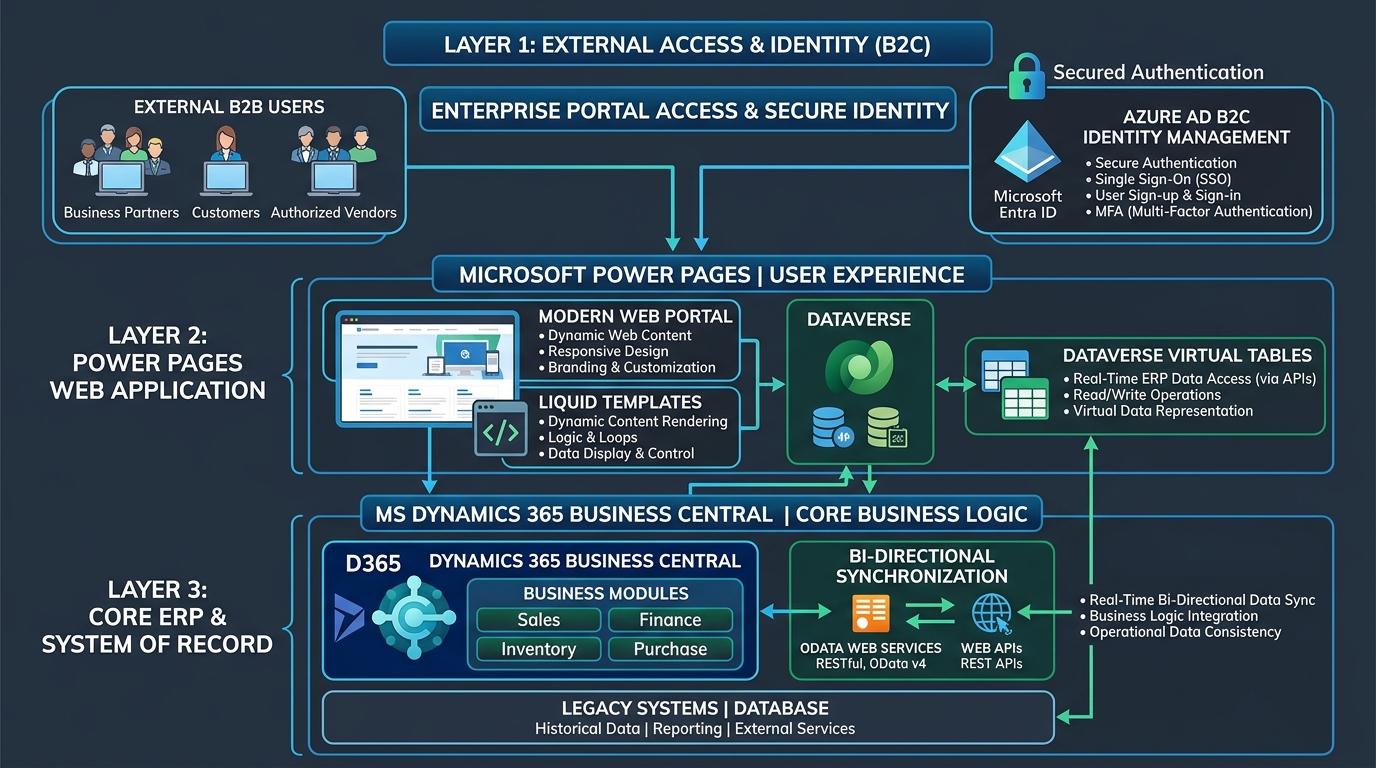
The architectural blueprint consists of three distinct layers:
- Identity & External Access Tier: Third-party users authenticate through Microsoft Entra External ID (formerly Azure AD B2C), Google Workspace, or custom SAML/OIDC federations. Multi-factor authentication (MFA) and automated self-registration are handled entirely by Microsoft's identity platform.
- Experience & Governance Tier (Power Pages): The public-facing web portal renders dynamic templates, forms, and analytical dashboards. Web Roles and Table Permissions strictly govern record-level access so Company A can never view records belonging to Company B.
- System of Record Tier (Dynamics 365 Business Central): Business Central remains the single immutable source of truth. All transactional records—Purchase Orders, Vendor Ledger Entries, Sales Invoices, and Item Availability—are exposed in real time through native OData v4 web APIs and Dataverse virtual tables.
3. Real-Time Dataverse Virtual Tables: Zero Data Duplication
In older portal architectures, organizations were forced to configure scheduled ETL batch pipelines that copied ERP data into Dataverse tables every 15 minutes. This legacy approach created two severe problems: data latency and exorbitant Dataverse storage consumption fees.
Modern Power Pages implementations leverage Dataverse Virtual Tables for Business Central. Virtual tables project ERP entities directly into Dataverse as if they were native Dataverse tables, but zero transactional data is permanently stored in Dataverse storage.
| Architecture Factor | Legacy Dataverse Sync (ETL) | Dataverse Virtual Tables (Modern) |
|---|---|---|
| Data Freshness | Batch latency (15–60 min delay) | Sub-second real-time queries directly against ERP |
| Dataverse Storage Cost | High ($40/GB per month for relational tier) | Near zero (only metadata and schema definitions stored) |
| ERP Business Logic Execution | Bypassed during batch insert | Triggers native Business Central validation events on write |
| Transaction Consistency | Prone to sync collisions and queue lag | ACID-compliant transactions executed inside Business Central |
Architectural Recommendation: Virtual Tables for Dynamic Records
Use Dataverse Virtual Tables for dynamic, high-volume transactional records (Purchase Orders, Shipments, Invoices, Ledger Entries). For static profile information that rarely changes (Vendor Company Name, Contact Information, Preferred Currency), standard cached Dataverse tables offer optimal performance.
4. Security & Isolation: Web Roles and Row-Level Permissions
The most critical requirement for any customer or vendor portal is bulletproof tenant isolation. A single data leak between competing suppliers or wholesale customers will destroy enterprise trust and violate confidentiality agreements.
Power Pages enforces security through a layered defense-in-depth model:
- Account-Level Contact Scoping: Every external portal user is represented as a Contact record in Dataverse, linked to a specific Vendor or Customer Account number in Business Central.
- Table Permissions Hierarchy: Table Permissions define specific Read, Write, Create, and Delete rights. Permissions are scoped strictly to Account or Contact level, preventing global queries.
- Column-Level Security: Sensitive ERP fields—such as internal margin calculations, vendor internal notes, or cost prices—are completely hidden from portal form metadata and cannot be queried even via browser developer tools.
- Content Delivery Network (CDN) & Web Application Firewall (WAF): Enterprise Power Pages environments include built-in Azure Front Door WAF protection against DDoS, SQL injection, and automated scraping attacks.
5. High-Impact Use Cases: Vendor & Customer Workflows
A. B2B Vendor Collaboration & PO Acknowledgments
Rather than chasing suppliers for purchase order delivery dates, the portal automatically presents newly released Business Central purchase orders. The supplier logs in, reviews line items, enters promised ship dates, and uploads packing slips.
The acknowledgment writes back directly into Business Central through the virtual table, instantly updating the procurement planning engine and alerting the buyer without manual intervention.
B. Self-Service Invoice Status & 3-Way Reconciliation
Vendors frequently call accounting teams to ask: "Has Invoice #10492 been approved yet?" A Power Pages vendor portal gives suppliers real-time visibility into the status of their invoices: Intake, In Review, Matched with Receipt, or Scheduled for Payment.
Paired with Autonomous AP Automation, disputed quantities or pricing differences can be flagged directly within the portal, allowing suppliers to upload credit memos in minutes.
C. Wholesale Customer Ordering & Live Inventory Visibility
B2B distributors and wholesale clients can browse catalog items, view contract-specific tiered pricing from Business Central sales price lists, check real-time warehouse inventory availability, and submit sales orders that post directly into the ERP as Sales Orders or Quotes.
6. Licensing Economics: Power Pages vs. Named ERP Seats
One of the strongest commercial justifications for deploying Power Pages is the licensing efficiency for external user populations.
| User Population Tier | Business Central Team Member Seats | Power Pages Capacity Packs | Annual Savings |
|---|---|---|---|
| 100 Active External Users | $9,600 / year ($8/mo/user) | $2,400 / year (authenticated tier) | 75% Savings |
| 500 Active External Users | $48,000 / year | $7,200 / year (tiered pack discount) | 85% Savings |
| 2,000 Active External Users | $192,000 / year | $18,000 / year (enterprise tier) | 90% Savings |
Power Pages is billed based on active authenticated users per month (or anonymous page views), not named user seats. If a vendor only logs in during three months of the year, you only pay for those three months.
Planning a Customer or Vendor Self-Service Portal?
Allgrow Technologies engineers custom B2B portals using Microsoft Power Pages and Dynamics 365 Business Central. Our senior architects design clean virtual table schemas, role-based security, and zero-latency ERP workflows that scale securely.
7. Enterprise Production Readiness Checklist
Before moving any Power Pages portal into production, enterprise architects should verify each requirement on this hardening checklist:
Pre-Go-Live Hardening Protocol
- Virtual Table Indexing: Ensure all Business Central API pages utilize filtered keys and partial record loading to prevent full table scans.
- Entra ID Multi-Factor Authentication: Mandate MFA for all external vendor administrative accounts.
- Table Permissions Audit: Run Microsoft Power Platform checker to verify no tables have global anonymous read/write permissions.
- Application Insights Telemetry: Connect Power Pages and Business Central to a centralized Azure Application Insights workspace for end-to-end trace correlation.
- ALM & DevOps Pipelines: Manage portal assets, liquid templates, and configuration records as code using GitHub Actions or Azure DevOps with Power Platform CLI.