Executive Strategic Overview
Enterprise contact centers are transitioning from passive conversational chatbots to coordinated, task-autonomous AI agents. With the latest release wave, Microsoft Dynamics 365 Customer Service and the Microsoft Copilot Contact Center platform introduce six built-in autonomous AI agents designed to integrate natively into the exact workflows service teams already operate. Rather than forcing organizations to build custom agents from scratch, these purpose-built agents handle specific stages of the service lifecycle—from real-time intent classification and knowledge harvesting to 100% transcript QA scoring and operational capacity forecasting. This architectural guide maps where each agent fits, what data streams it reviews, who validates its output, and the exact Dataverse prerequisites required before turning them on.
Key Takeaways for Customer Experience (CX) & IT Leaders
- Task-Specialized Autonomous Agents: Instead of relying on a single monolithic bot, Microsoft deploys six specialized agents: Case Management, Knowledge Management, Intent, Customer Assist, Quality Assurance (QA), and Service Operations.
- Mandatory Human-in-the-Loop (HITL) Governance: Autonomy does not mean unmonitored execution. Each agent features explicit approval gates—ranging from live agent confirmation to supervisor scorecard reviews.
- The Knowledge Hygiene Dependency: Agents are only as reliable as their grounding data. Turning on the Assist or Knowledge Agent without curating legacy Dataverse articles leads to confident hallucinations.
- 100% Quality Auditing: The Quality Assurance Agent replaces traditional manual 1%–2% sample spot-checks with automated, objective scoring across 100% of calls and chats.
- Modular Phased Enablement: Organizations do not need to activate all six agents at once; Microsoft supports modular deployment starting with high-impact, low-risk agents like Assist and QA.
Table of Contents
- 1. The Agentic Evolution: From Generic Chatbots to Specialized Service Agents
- 2. Master Blueprint: The 6 Built-In AI Agents Mapped
- 3. In-Depth Operational Breakdown of the 6 AI Agents
- 4. Multi-Agent Orchestration & Dataverse Pipeline
- 5. Pre-Deployment Dataverse & Security Prerequisites
- 6. The Allgrow Implementation Framework: Phased Pilot Sprints
- 7. Frequently Asked Questions (FAQ)
1. The Agentic Evolution: From Generic Chatbots to Specialized Service Agents
For the past three years, contact center AI has predominantly centered around single-turn generative chat: summarization widgets, suggested replies, and conversational FAQ bots. While helpful, these tools require constant human prompting and operate in disconnected silos.
The next frontier—Agentic AI—shifts the paradigm from reactive assistance to proactive, role-based autonomy. Within Microsoft Dynamics 365 Customer Service and the Copilot Contact Center platform, autonomous agents are equipped with defined personas, specific event triggers, access to enterprise Dataverse tables, and concrete objectives.
Instead of one massive model trying to do everything, Microsoft has divided contact center operations across six specialized autonomous agents, each mapped to a distinct phase of the customer service lifecycle.
2. Master Blueprint: The 6 Built-In AI Agents Mapped
Below is the comprehensive operational mapping of all six built-in agents, detailing their input telemetry, human-in-the-loop oversight requirements, and technical prerequisites:
| AI Agent Name | What the Agent Reviews (Inputs) | Human-in-the-Loop (Who Checks Output) | Critical Prerequisites Before Activation |
|---|---|---|---|
| 1. Case Management Agent | Inbound emails, portal webforms, chat transcripts, customer case histories, and SLA deadlines. | Tier-1 / Tier-2 Service Reps review proposed case classifications, priority updates, and draft resolution summaries. | Standardized Dataverse case subject trees, historical case resolution data, and calibrated routing queues. |
| 2. Customer Knowledge Management Agent | Closed case resolution notes, successful rep chat scripts, recurring unanswered search queries. | Knowledge Base (KB) Managers and Subject Matter Experts (SMEs) review and publish auto-generated KB drafts. | Configured Dataverse KB article schema, review-and-approval lifecycle stages, and content taxonomies. |
| 3. Customer Intent Agent | Real-time incoming customer messages, voice IVR inputs, sentiment velocity, customer profile VIP tags. | Omnichannel Unified Routing engine (autonomous dispatch) monitored by Contact Center Supervisors. | Dynamics 365 Omnichannel streams enabled, skill-based routing models, and historical intent training data. |
| 4. Customer Assist Agent | Active live conversation turns, verified enterprise knowledge bases, ERP order history, warranty records. | The live frontline customer service representative actively handling the customer call or chat. | Grounded Dataverse/SharePoint search connectors, indexed internal documentation, and prompt safety filters. |
| 5. Quality Assurance (QA) Agent | 100% of recorded call audio transcripts, chat sessions, compliance disclaimers, agent hold times, empathy signals. | QA Compliance Managers and Contact Center Team Leads review flagged outliers, disputes, and aggregated scorecards. | Azure Speech-to-Text transcription, customized QA scorecard rubrics, and automated PII redaction rules. |
| 6. Service Operations Agent | Real-time queue depth, agent handle times (AHT), SLA escalation telemetry, shift logs, historical arrival patterns. | Service Operations Directors, Workforce Management (WFM) schedulers, and Contact Center Planners. | Azure Application Insights telemetry, workforce scheduling profiles, and historical omnichannel operational logs. |
3. In-Depth Operational Breakdown of the 6 AI Agents
1. Case Management Agent: Autonomous Ticket Ingestion & Triage
The Case Management Agent eliminates the manual friction of ticket intake, categorization, and routing. When an inbound customer email or portal ticket arrives, the agent analyzes the full narrative, extracts key entities (account numbers, product serials, sentiment urgency), and matches them against your Dataverse subject tree.
- What It Reviews: Unstructured customer emails, web portal submissions, past ticket history for the account, and active SLA entitlements.
- What It Outputs: Clean, structured Case records in Dataverse with auto-populated priority, category, case summary, and suggested next actions.
- Human Oversight Gate: When a human representative opens the case, the agent’s findings appear as an interactive panel. The rep can accept, adjust, or override the suggested classification with a single click.
- Prerequisites: A clean Dataverse case subject hierarchy, configured SLA timers, and inbound email routing queues.
2. Customer Knowledge Management Agent: Automated Knowledge Harvesting
In most customer service departments, tribal knowledge lives in closed tickets and never makes it into the public knowledge base. The Customer Knowledge Management Agent actively mines closed case transcripts and internal resolution notes to identify recurring problems that lack documentation.
- What It Reviews: Resolution descriptions from high-satisfaction closed cases, chat transcripts between tier-2 specialists and tier-1 reps, and failed search telemetry from the customer self-service portal.
- What It Outputs: Publication-ready Knowledge Base (KB) article drafts structured in standard problem-solution format with keywords and metadata tags.
- Human Oversight Gate: Drafts are routed to designated Knowledge Managers or SMEs via a Dataverse approval business process flow. No article is published externally without explicit human sign-off.
- Prerequisites: Configured Dataverse KB article approval workflows and content tagging taxonomy.
3. Customer Intent Agent: Real-Time Omnichannel Dispatch
Traditional IVRs and web chat routing rely on rigid keyword matching or frustrating touch-tone menus (“Press 1 for Billing”). The Customer Intent Agent performs real-time semantic analysis of customer statements to determine underlying intent, emotional sentiment, and customer lifetime value.
- What It Reviews: Live customer voice utterances, opening chat prompts, recent billing discrepancies, and CRM account tier.
- What It Outputs: Real-time intent tags (e.g.,
Intent: Cancellation_Risk,Sentiment: High_Frustration,Tier: Strategic_Enterprise) injected into the Unified Routing context. - Human Oversight Gate: Contact Center Supervisors monitor queue distribution heatmaps and can adjust intent sensitivity thresholds dynamically.
- Prerequisites: Dynamics 365 Omnichannel for Customer Service voice/chat channels enabled, alongside configured Unified Routing skill profiles.
4. Customer Assist Agent: Real-Time In-Flight Guidance
Operating side-by-side with frontline representatives in the Customer Service workspace, the Customer Assist Agent continuously listens to the conversation, anticipates customer needs, and surfaces verified troubleshooting steps, ERP order lookups, and suggested replies in real time.
- What It Reviews: Live conversation transcript streams, customer CRM profile, warranty records in Business Central/ERP, and verified knowledge bases.
- What It Outputs: Contextual prompt suggestions, step-by-step diagnostic checklists, and one-click draft replies embedded directly in the rep’s workspace.
- Human Oversight Gate: The frontline agent maintains 100% control over whether to use, edit, or dismiss the suggested response before sending it to the customer.
- Prerequisites: Grounded enterprise knowledge sources in Dataverse or SharePoint, and tuned Copilot Studio prompt safety boundaries.
5. Quality Assurance (QA) Agent: Objective 100% Interaction Auditing
Traditionally, contact center QA supervisors only evaluate 1% to 2% of recorded interactions due to manual time constraints, creating statistical bias and missed compliance violations. The QA Agent audits 100% of recorded customer calls and chat transcripts automatically.
- What It Reviews: Speech-to-text call transcripts, chat archives, mandatory compliance disclaimers (e.g., recorded line notices, PCI DSS payment disclosures), agent empathy markers, and dead-air hold times.
- What It Outputs: Automated interaction scorecards, sentiment progression curves, and immediate alerts for non-compliant conversations.
- Human Oversight Gate: QA Directors and Team Leads review aggregated compliance dashboards and manually calibrate disputed agent scorecards.
- Prerequisites: Azure AI Speech-to-Text call recording enabled, customized scoring rubrics, and automated PII masking rules.
6. Service Operations Agent: Predictive Capacity & Queue Telemetry
Operating at the command center level, the Service Operations Agent continuously monitors queue velocity, agent capacity utilization, and SLA burn rates. Rather than alerting supervisors after an SLA has already breached, it predicts bottlenecks 30–60 minutes in advance.
- What It Reviews: Active queue depths across all channels, agent wrap-up times, break schedules, incoming volume trends, and historical day-of-week patterns.
- What It Outputs: Automated re-allocation recommendations (e.g., “Reassign 4 Tier-1 chat reps to Tier-2 phone queue to prevent 15-minute SLA breach”) and executive daily trend summaries.
- Human Oversight Gate: Workforce management schedulers and contact center managers review and authorize proposed shift and queue adjustments.
- Prerequisites: Azure Application Insights telemetry and configured Workforce Management (WFM) scheduling profiles.
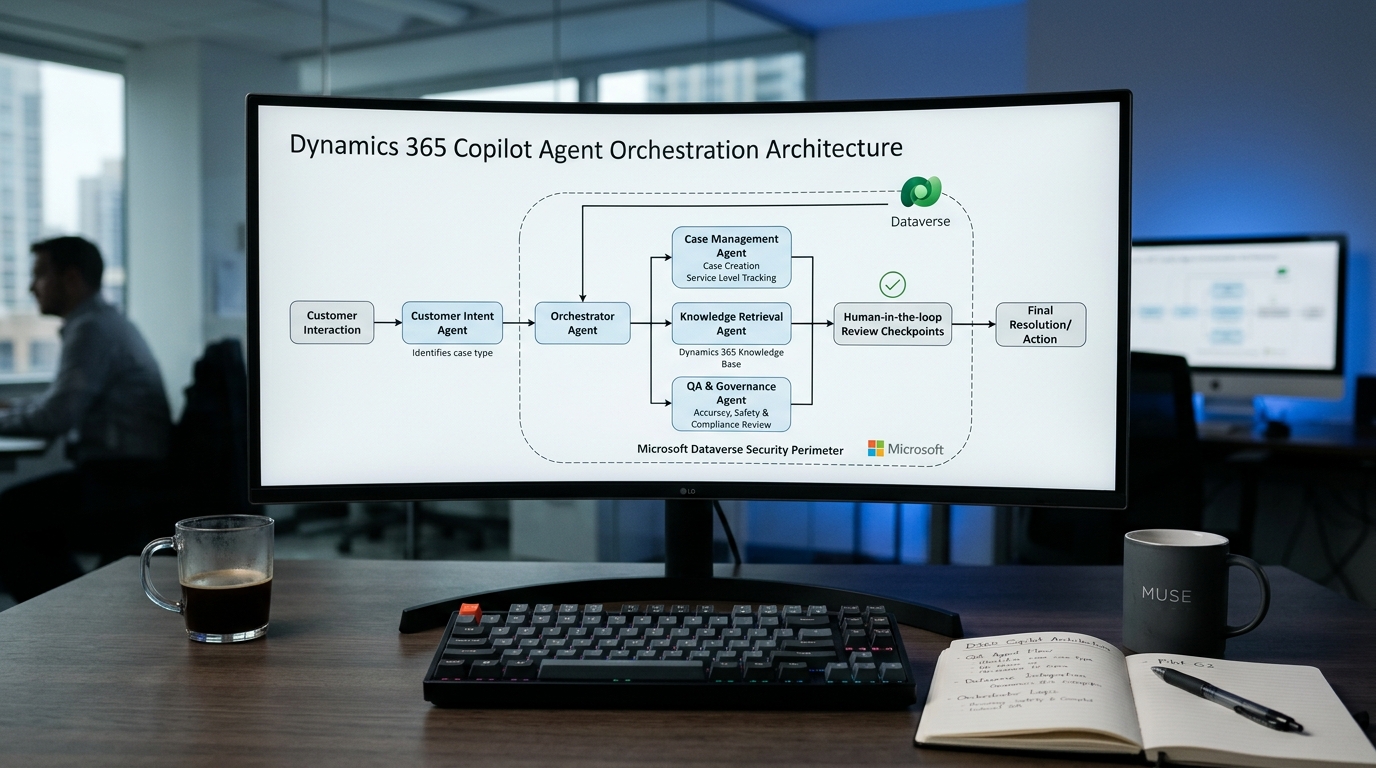
4. Multi-Agent Orchestration & Dataverse Pipeline
The true power of Microsoft’s architecture lies in agent-to-agent collaboration through Microsoft Dataverse. Rather than operating in isolated bubbles, the agents feed into each other in a continuous, self-reinforcing intelligence loop:
▶ The Continuous Service Intelligence Loop
- The Customer Intent Agent detects an urgent billing dispute and dispatches the interaction to a senior tier-2 agent.
- During the interaction, the Customer Assist Agent pulls the customer’s payment history from Business Central and drafts a resolution.
- Once the case is solved, the Case Management Agent summarizes the transcript and closes the ticket with clean dimensional codes.
- The QA Agent scores the interaction, verifying that mandatory billing disclaimers were recited.
- The Knowledge Management Agent notices this dispute represents a new recurring issue and drafts an internal KB article for review.
- The Service Operations Agent ingests the telemetry to update staffing forecasts for billing cycles.
5. Pre-Deployment Dataverse & Security Prerequisites
Activating autonomous AI agents in a production contact center without prior architecture validation is a recipe for chaos. Before flipping the switch, IT and CX leadership must verify these four foundational guardrails:
Dataverse Knowledge Hygiene
Deprecate outdated, conflicting KB articles. If an AI agent accesses three legacy documents with contradictory refund policies, it will provide inconsistent guidance to frontline reps.
Role-Based Security & RBAC
Ensure that AI agents inherit the exact Dataverse security roles and row-level permissions of the interacting human user, preventing unauthorized exposure of executive or VIP account details.
PII Redaction & PCI Compliance
Enable automated Azure AI transcription masking for credit card numbers, social security identifiers, and health records before text payloads are indexed by QA or Assist models.
Calibrated Unified Routing
Before enabling the Customer Intent Agent, configure explicit skill profiles and fallback queues in Unified Routing so that ambiguous intent tags route gracefully to human supervisors.
6. The Allgrow Implementation Framework: Phased Pilot Sprints
At Allgrow Technologies, we advise enterprise clients against “big-bang” deployments of all six agents simultaneously. Instead, we structure customer service modernization into three disciplined, milestone-driven sprints:
- Sprint 1 — Frontline Empowerment (Assist & QA): Activate the Customer Assist Agent and Quality Assurance Agent first. Frontline reps immediately benefit from suggested replies and summaries, while leadership gains 100% compliance auditing without disrupting customer-facing workflows.
- Sprint 2 — Knowledge & Intake Automation (Case Management & Knowledge): Once data hygiene is calibrated, enable automated case categorization and knowledge article harvesting from closed resolutions.
- Sprint 3 — Real-Time Orchestration (Intent & Operations): Deploy the Customer Intent Agent for autonomous omnichannel routing and activate the Service Operations Agent for predictive capacity management.
Explore Strategic Dynamics 365 Architecture & Implementation Guides:
Modernize Your Contact Center with Autonomous AI Agents
From Dataverse architecture and Unified Routing calibration to Human-in-the-Loop governance and Copilot Studio extensions, Allgrow Technologies deploys secure, high-ROI AI agent architectures across enterprise service organizations.
7. Frequently Asked Questions (FAQ)
Are these 6 AI agents included with Dynamics 365 Customer Service Enterprise licenses?
How does Microsoft protect customer data privacy and prevent public LLM training?
Can we customize the behavior and prompts of these built-in agents?
What is the primary reason AI contact center deployments underperform?