

Executive Summary: Why US Mid-Market Enterprises Must Modernize in 2026
Hundreds of North American manufacturing, distribution, and specialty service organizations continue running mission-critical operations on legacy Dynamics NAV (versions 2013, 2015, 2016, 2017, and 2018). With mainstream Microsoft security support expired and on-premises Windows Server infrastructure facing elevated cyber-insurance hurdles, staying on legacy C/AL code poses escalating operational liabilities. Migrating to Business Central Cloud SaaS is not simply an IT upgrade—it transforms core financial controls, automates US 1099 tax and multi-state sales tax compliance, enables native Power Platform workflow integration, and eliminates recurring on-prem SQL server capital expenditures.
1. The Strategic Business Case: Total Cost of Ownership (TCO) Comparison
For US finance leaders evaluating a migration proposal, the primary question is financial return: how does the ongoing subscription cost of Business Central SaaS compare to the hidden operational costs of maintaining on-premises NAV infrastructure?
Over a five-year operating window, on-premises Dynamics NAV incurs substantial unbudgeted costs:
- Dedicated Infrastructure Maintenance: Physical server refreshes, Windows Server and SQL Server licensing, virtualization software, and off-site backup storage.
- Cybersecurity & Compliance Premiums: Escalating US corporate cyber-insurance rates for organizations operating legacy servers without continuous automated zero-day patching.
- Costly Point Upgrades: Monolithic upgrade cycles every four to five years that require months of custom code merging, disruptive downtime, and high capital outlay.
- Isolated Cloud Tooling: Inability to seamlessly connect modern Power BI reporting, Microsoft Fabric analytics, and AI Copilot capabilities without brittle custom ODBC connectors.
By transitioning to Dynamics 365 Business Central SaaS, infrastructure overhead is replaced by continuous Microsoft cloud updates delivered semiannually (Release Waves 1 and 2), guaranteed 99.9% cloud uptime SLA, and automated geo-redundant Azure data protection.
2. Microsoft Licensing Strategy: Bridge to the Cloud 2 & CSP Incentives
Organizations currently paying annual Business Ready Enhancement Plan (BREP) maintenance on Dynamics NAV possess significant licensing equity. Microsoft provides targeted commercial promotions designed to minimize transitional cash flow burdens for existing customers:
Bridge to the Cloud 2 Promotion: Eligible customers with active enhancement plans can transition to Business Central Cloud subscription licenses (Cloud Solution Provider / CSP) at a discount of up to 40% for up to a three-year term. Crucially, this program allows organizations to maintain their on-premises NAV dual-use rights during the active migration project, ensuring zero licensing overlap penalties while the new cloud environment is configured and tested.
Named User Rightsizing: Because Dynamics NAV historically utilized concurrent user licensing while Business Central uses named user subscriptions, a thorough user access audit is conducted during discovery. Many occasional users who previously consumed full NAV client licenses can be provisioned as Team Members ($8/user/month), reducing total monthly recurring software expenses.
3. Technical Modernization: Converting Legacy C/AL Code to Clean AL Extensions
The most critical technical hurdle in any NAV migration is handling years of customizations built directly into the base application code. In legacy NAV, developers directly edited core tables, codeunits, and posting routines using the C/SIDE development environment and C/AL language.
Business Central SaaS strictly prohibits direct modification of base application objects. All custom behavior must exist inside modular, event-driven AL extensions that interact with the core platform via publish-subscribe events.
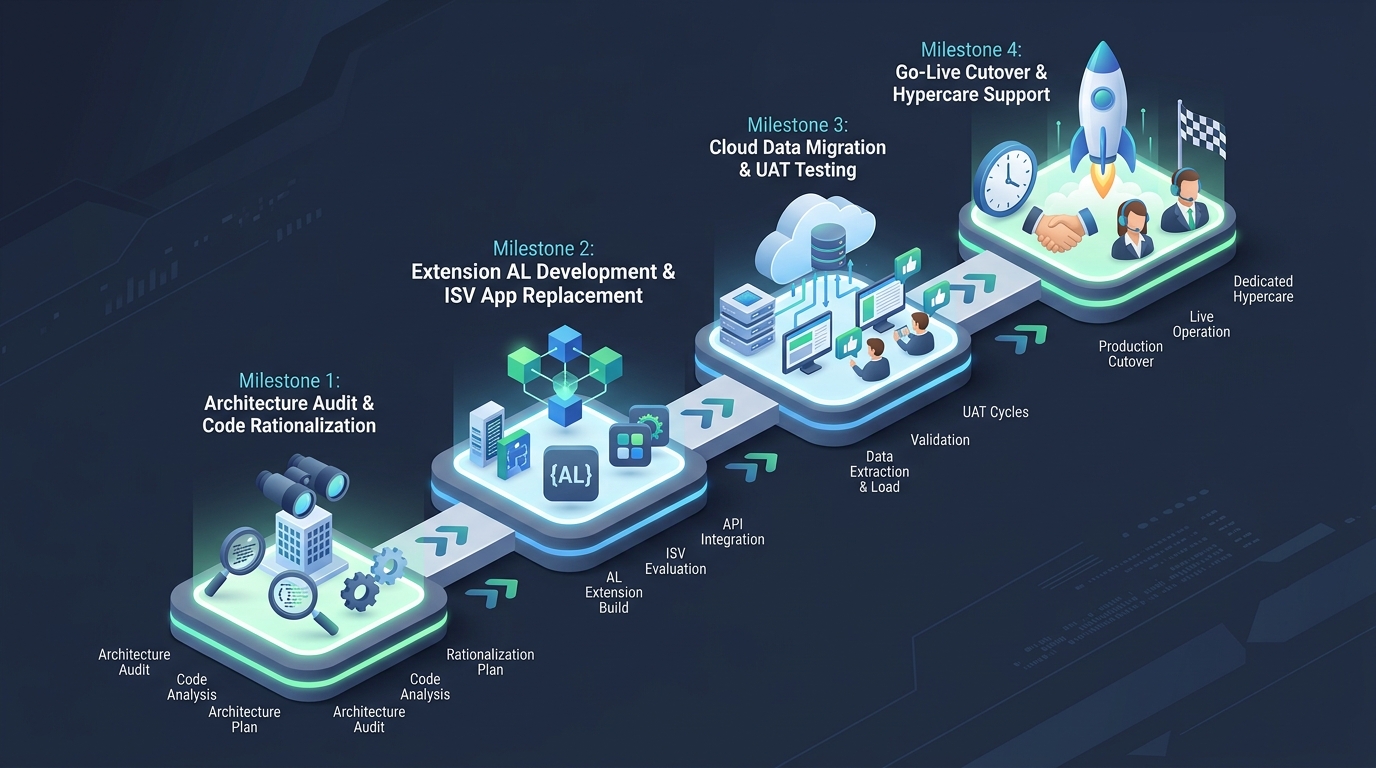
A successful technical modernization follows an aggressive code rationalization process:
- Customization Rationalization Audit: In typical legacy NAV deployments, up to 40% of original custom modifications are now natively available in modern Business Central standard functionality (such as modern document sending profiles, automated email logging, and dimensional posting controls). These legacy modifications are completely retired rather than rebuilt.
- ISV AppSource Modernization: Third-party add-ons previously compiled into C/AL—such as shipping automation, EDI document interchange, and warehouse barcoding—are replaced with certified Microsoft AppSource cloud extensions, shifting ongoing upgrade maintenance to the ISV vendors.
- Event-Driven AL Refactoring: Truly proprietary intellectual property and specialized business logic are refactored into isolated AL extensions utilizing standard integration event subscribers.
4. North American Operational Localization: Taxes, 1099s & Banking
For US enterprises, specific fiscal and banking integrations must transition cleanly without operational hiccup on Day 1:
| Functional Domain | Legacy Dynamics NAV Architecture | Modern Business Central Cloud Architecture | Operational Advantage |
|---|---|---|---|
| US Sales Tax Compliance | Customized tax area tables or legacy on-prem tax calculation DLLs | Direct cloud API connector to Avalara AvaTax, Vertex, or standard US tax schedules | Real-time multi-jurisdiction nexus calculation and automated exemption certificate validation |
| Vendor 1099 Reporting | Manual annual patch updates or modified report objects each tax year | Built-in Microsoft 1099 electronic reporting with continuous regulatory compliance updates | Eliminates annual partner consulting fees for mandatory IRS form specification changes |
| Electronic Banking & ACH | Customized flat-file export codeunits for NACHA format banking files | Native Data Exchange Definitions supporting standard NACHA CCD/PPD, Positive Pay, and bank feeds | Secure automated ACH disbursements and direct bank statement reconciliation via Envestnet Yodlee |
| Shipping & Freight | On-premise carrier workstations with local ODBC database integrations | Cloud-native multi-carrier shipping apps (e.g., Dynamic Ship, Pacejet) integrated via REST APIs | Automated rate shopping, label printing, and tracking writeback directly inside warehouse pick screens |
5. Data Migration Strategy: Historic Ledgers vs. Master Data Opening Balances
One of the most consequential decisions facing an ERP steering committee is determining how much historical transactional data to migrate into the cloud environment.
Approach A: Clean Cutover (Recommended Best Practice): Master records (Customers, Vendors, Chart of Accounts, Fixed Assets, Items, and Bills of Material) are extracted, cleaned, and loaded into Business Central alongside opening financial balances, open accounts receivable, open accounts payable, and serialized inventory quantities. Historic ledger entries remain fully accessible in a read-only archived NAV SQL database or an Azure Data Lake repository for compliance inquiries. Advantage: Drastically lower migration costs, zero legacy data corruption in the new cloud tenant, and faster project delivery.
Approach B: Full Transactional Ledger Replication: Using Microsoft's Cloud Migration Replication tool to sync all historical G/L entries, item ledger entries, and document tables through intermediate upgrade steps (e.g., NAV 2018 to Business Central on-premises, then to BC Cloud). Advantage: Historical comparative reporting inside Business Central. Disadvantage: Significantly higher project budget, longer cutover downtime, and risk of replicating historic data inconsistencies into the clean cloud environment.
6. Realistic Investment Models & Implementation Timelines for US Organizations
Transparency around project scope, timeline, and investment is paramount for executive alignment:
| Organizational Profile | Typical Scope & Complexity | Estimated Timeline | Consulting Budget Range (USD) |
|---|---|---|---|
| Standard Migration (Mid-Market) | NAV 2016–2018, light customization, standard finance, sales, and purchasing, 1–2 AppSource apps | 10 – 14 Weeks | $45,000 – $75,000 |
| Advanced Manufacturing & WMS | NAV 2013–2017, custom production routing, barcoding, 3–5 ISVs, complex multi-state sales tax | 16 – 22 Weeks | $80,000 – $135,000 |
| Enterprise Multi-Entity | Multi-company consolidation, custom EDI matrix, bespoke field service, heavy legacy C/AL refactoring | 24 – 32 Weeks | $140,000 – $225,000+ |
Timing Note for US Organizations: Go-live dates should be scheduled strategically around the enterprise fiscal calendar. US businesses should avoid go-live dates during fourth-quarter holiday sales peaks or fiscal year-end financial close periods. Ideal cutover windows typically align with Q1 or Q3 quiet periods.
7. Partner Selection & Operational Risk Mitigation
A successful NAV-to-BC migration hinges on partner capability in both legacy C/AL code architecture and modern cloud AL extension standards. When evaluating migration partners, US leadership teams should verify:
- Deep Legacy NAV Code Knowledge: The engineering team must understand legacy NAV architecture (codeunit 80 sales posting, codeunit 90 purchase posting, and dimension buffer handling) to properly deconstruct custom logic without breaking business rules.
- Dedicated User Acceptance Testing (UAT) Cadence: Conducting at least two complete mock data cutovers where onshore departmental leads execute end-to-end sales orders, warehouse shipments, and financial reconciliations.
- Dedicated Post Go-Live Hypercare: Contractual commitment to real-time US business-hours support during the critical first month-end financial close in Business Central.
8. Frequently Asked Questions (FAQ)
Microsoft mainstream support has ended for all legacy Dynamics NAV versions. While the software will continue to run, the organization incurs substantial risks: vulnerability to unpatched zero-day security threats, failure to comply with updated IRS 1099 or banking standards, incompatibility with modern Windows Server versions, and increasing cyber insurance policy deductibles.
The underlying business concepts in Business Central (Chart of Accounts, Dimensions, General Journals, Sales Orders, and Item Cards) are directly derived from Dynamics NAV. While the modern web client interface offers search shortcuts, personalized views, and Microsoft 365 Outlook integration, existing NAV users typically reach full operational proficiency within two to three weeks of hands-on UAT testing.
Historic data is safely preserved. Most organizations retain their existing on-premises SQL database in a read-only virtual machine or export historic ledger tables into an Azure Data Lake connected to Power BI. This satisfies IRS seven-year audit retention requirements at virtually zero hosting cost while keeping the new cloud Business Central database fast and streamlined.
Yes. Using the Clean Cutover methodology, master records and opening balances can be extracted from any version of Dynamics NAV (even older versions like NAV 4.0 or 5.0) and imported directly into Business Central Cloud using standard RapidStart Configuration Packages or migration APIs.