

Executive Summary: Why Traditional ERP Interfaces Restrict Operational Velocity
Mid-market and enterprise organizations running Microsoft Dynamics 365 Business Central often face a common operational dilemma: field service technicians, warehouse operators, shop floor managers, and sales reps require instant access to ERP data, but traditional Business Central web clients are too rigid, overly licensed, or too complex for rapid task execution.
Engaging specialized custom Power Apps development services bridges this divide. By decoupling task-specific user interfaces into lightweight Canvas Apps or process-driven Model-Driven applications while keeping Business Central as the single source of financial and inventory truth, enterprises achieve sub-second operational data capture, eliminate manual data re-entry, and save tens of thousands in full Named User ERP licensing.
1. The Architectural Dilemma: Canvas Apps vs. Model-Driven Apps for Business Central
A foundational decision during any enterprise Power Apps consulting engagement is determining whether the business outcome demands a Canvas App, a Model-Driven App, or a hybrid multi-screen solution. Selecting the incorrect paradigm early leads to performance bottlenecks, poor UI adoption, and excessive maintenance.
Canvas Apps (Pixel-Perfect Task Execution)
Built for mobile-first, field-ready, or highly stylized workflows. Canvas apps allow custom UI layouts, barcode scanning with camera hardware, GPS geolocation stamping, and offline-first data caching. Ideal for warehouse picking, shop floor machine inspections, and quick sales order entry.
Model-Driven Apps (Data-Dense Back Office)
Component-focused applications automatically generated from the underlying Microsoft Dataverse schema. They provide standardized enterprise grids, multi-stage Business Process Flows (BPFs), advanced filtering, and native role-based security. Ideal for customer service managers, contract approval teams, and credit analysts.
| Evaluation Criterion | Canvas Applications | Model-Driven Applications |
|---|---|---|
| Primary User Persona | Frontline mobile workforce, warehouse staff, field technicians | Operational managers, compliance reviewers, back-office controllers |
| Form Factor & UI | Custom responsive pixel layout, tailor-made touch targets | Standard responsive enterprise grid, unified Microsoft UI interface |
| Offline Data Sync | Native local collections and device cache synchronization | Mobile offline profiles configured via Dataverse environment settings |
| Data Source Flexibility | Direct connectors, Dataverse Virtual Tables, REST APIs | Exclusively built upon Microsoft Dataverse tables and virtual entities |
| Development Velocity | Fast prototyping for focused, single-purpose task screens | Extremely fast for complex relational data models and audit logs |
2. Connecting Power Apps to Business Central: Standard Connector vs. Dataverse Virtual Tables
The technical bridge connecting Microsoft Power Apps to Dynamics 365 Business Central determines whether your application responds in 200 milliseconds or hangs for 8 seconds under production load. During our Microsoft Power Platform consulting engagements, we evaluate three primary integration patterns:
Option A: The Standard Business Central Connector
The out-of-the-box Business Central connector communicates via OData v4 web services exposed from your Business Central tenant. While simple to configure for demonstrations, it creates severe challenges in enterprise environments:
- Delegation Boundaries: Delegation limits of 500 to 2,000 records prevent client-side sorting and complex filtering across large transaction tables such as Item Ledger Entries or Customer Ledger Entries.
- API Rate Limits & Throttling: Standard OData endpoints share resource quotas with all background job queues and report generation processes, risking 429 Too Many Requests or 504 Gateway Timeout responses during busy operating hours.
Option B: Dataverse Virtual Tables (The Modern Enterprise Gold Standard)
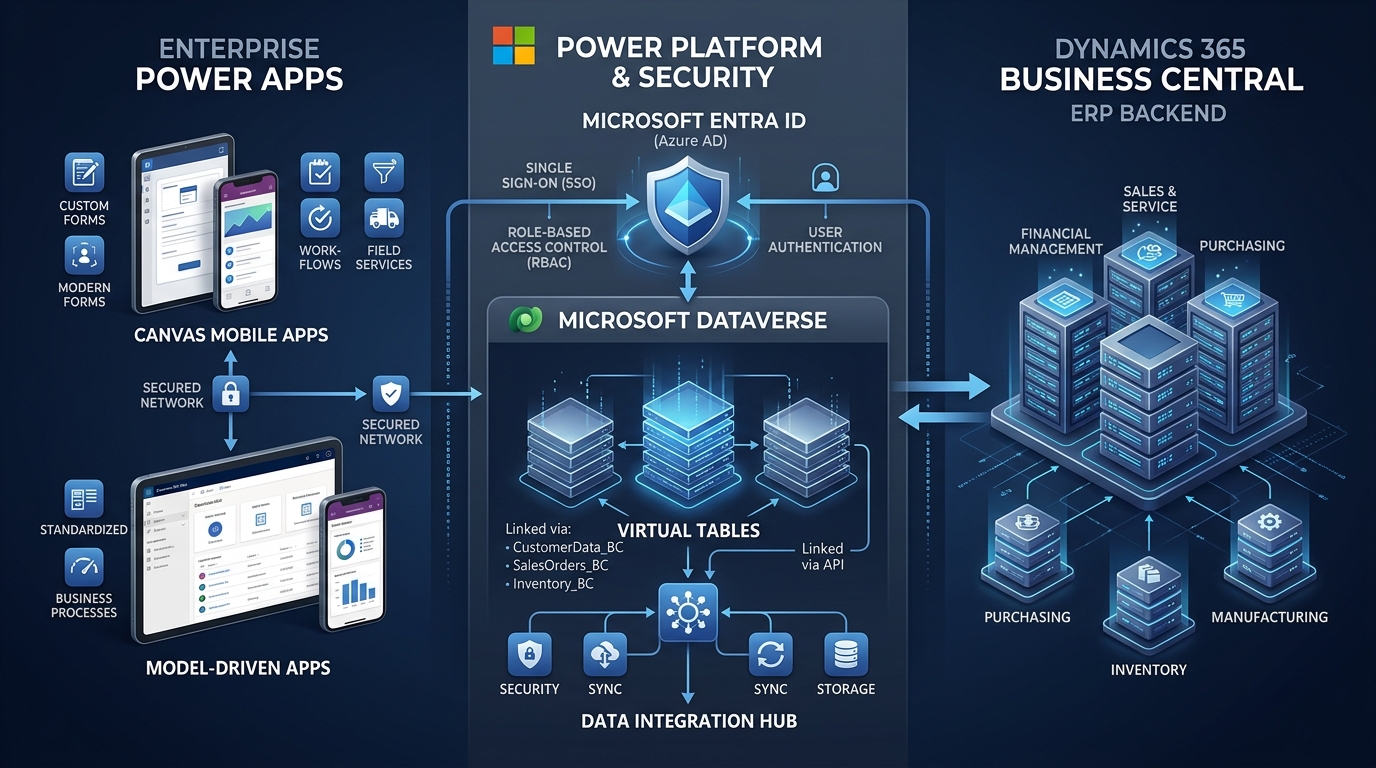
Introduced in recent release waves and expanded in 2026, Dataverse Virtual Tables represent the architectural best practice for enterprise integrations. Virtual Tables expose Business Central API endpoints as native tables inside Microsoft Dataverse without physically duplicating or synchronizing bulk data storage.
- Zero Storage Replication: Data resides solely within Business Central SQL storage, eliminating data drift and expensive Dataverse capacity charges.
- Full Delegation Support: Dataverse query engines handle relational filtering, record lookups, and paging transparently, bypassing the 2,000-record Canvas delegation ceiling.
- Native Security Role Inheritance: Enforce Entra ID single sign-on (SSO) and row-level security policies directly within the Power Platform admin governance framework.
3. Overcoming Delegation and Performance Bottlenecks
When dealing with thousands of items, open sales lines, or customer accounts, inexperienced developers frequently encounter the dreaded yellow warning triangle in Power Apps: "Delegation warning: The search part of this formula might not work on large datasets."
Enterprise consulting architects resolve this through structural design rather than client-side workarounds:
- Architect Custom Business Central API Pages: Instead of binding Power Apps to standard page web services (which carry extensive UI logic and trigger calculations), publish dedicated lightweight API pages that query indexed keys and return only necessary fields.
- Pre-Filter at Data Source: Use delegable operators like StartsWith, Equals, or date boundaries on indexed fields so the Business Central SQL database performs the heavy lifting prior to transmitting payloads over the wire.
- Asynchronous Staging for Heavy Transactions: For order generation involving multiple line items, tax calculations, and warehouse allocations, submit the payload to an Azure Service Bus queue or asynchronous Dataverse batch action. This allows the frontline app to return an immediate success confirmation to the operator while background processors post the transaction cleanly into the ERP.
4. Field Service & Warehouse Operations: Offline Sync Architecture
In manufacturing plants, underground mining sites, remote distribution centers, or retail backrooms, continuous Wi-Fi and cellular coverage cannot be guaranteed. A mission-critical Power App must function reliably in disconnected states.
Our consulting practice implements robust offline architectures incorporating:
- Local In-Memory Collections: Frontline apps cache master data (product catalogs, bin locations, active customer lists) into local device storage upon morning login.
- Transactional Outbox Queues: Work orders, stock transfers, and inspection logs created offline are serialized into an internal outbox collection with unique client-side GUID keys.
- Automated Conflict Resolution: When network connectivity resumes, the app triggers a synchronization pipeline that replays transactions in chronological sequence against the enterprise data integration layer, handling inventory timestamp clashes and alerting supervisors only if human intervention is required.
5. Power Apps vs. Business Central Licensing Economics
One of the strongest commercial drivers for enterprise Power Apps consulting is optimizing Microsoft software licensing budgets. Full Business Central Premium licenses (around $100/user/month) or Essentials licenses (around $70/user/month) are excessive for personnel whose daily responsibilities require submitting an inspection checklist, clocking time on a production order, or checking raw material stock.
| Deployment Model | Approx. Monthly Cost / User | Best Suited Operational Roles |
|---|---|---|
| Full Business Central Essentials User | ~$70 / user / month | Accountants, financial controllers, purchasing managers, billing directors |
| Business Central Team Member | ~$8 / user / month | Read-only reviewers, basic time-entry submitters, internal requisitioners |
| Power Apps Per-App License | ~$5 / user / month | Dedicated frontline staff operating one or two specific business applications |
| Power Apps Pay-As-You-Go (Azure) | ~$10 / active user / month | Seasonal warehouse workers, quarterly auditors, irregular field inspectors |
By deploying focused Power Apps atop Business Central via proper multiplexing compliance and API governance, mid-market enterprises frequently decrease total user licensing costs by 35% to 60% while dramatically improving end-user adoption and input accuracy.
6. Application Lifecycle Management (ALM) & CoE Governance
A common failure mode for citizen-developed Power Apps is environment sprawl: apps built in Default environments with unmanaged solutions, direct production connections, and no source control.
Professional Power Apps consulting establishes a hardened Application Lifecycle Management (ALM) practice aligned with Microsoft’s Center of Excellence (CoE) Starter Kit:
- Three-Tier Environment Architecture: Isolated Development, User Acceptance Testing (UAT), and Production environments managed via Microsoft Power Platform Admin Center.
- Git-Backed Managed Solutions: All Canvas controls, Model-Driven sitemaps, connection references, and environment variables are packaged into managed solutions version-controlled in GitHub or Azure DevOps.
- Automated CI/CD Deployment Pipelines: Pull requests trigger automated solution validation, static code analysis, and staging deployment without manual canvas export/import steps.