
Across North American mid-market enterprises, a familiar and painful paradox unfolds every quarter: a company invests $100,000 to $250,000 modernizing from a legacy on-premises ERP or entry-level software to Microsoft Dynamics 365 Business Central Cloud. The implementation partner marks the project "Go-Live," cuts over the general ledger, collects their final milestone payment, and disappears. Six months later, the software is technically running in Microsoft's Azure cloud, but the company's daily operations feel like they are trapped in 2005.
The Post-Go-Live Reality Check
Finance teams export unposted journals to Excel for manual reconciliation. Warehouse workers abandon mobile barcode scanners to print paper pick tickets because custom extensions freeze under load. Crucial vendor invoices sit unposted because automated three-way matching was never properly calibrated. And when a critical month-end error halts billing, the partner's support desk takes four days to reply with an unhelpful generic response.
If this scenario mirrors your daily business operations, your organization does not need a costly, disruptive software re-implementation. You need a structured Business Central Implementation Rescue and Partner Takeover.

1. The "Living in the Past" Trap: Why Modern Cloud ERP Feels Broken
How does a state-of-the-art enterprise resource planning platform backed by billions of dollars in Microsoft R&D end up creating more friction than the twenty-year-old system it replaced? In over a decade of rescuing distressed ERP environments, we have found that failed implementations rarely stem from Microsoft software defects. Instead, they stem from three systemic delivery failures by the original implementation partner:
The "Lift-and-Shift" Anti-Pattern
When migrating from legacy Microsoft Dynamics NAV (Navision) or Dynamics GP, lazy implementation partners simply replicate 15-year-old on-premises customizations line by line into modern Business Central extensions. Instead of configuring native Business Central warehouse management, automated bank feeds, or modern approval hierarchies, they rebuild clunky legacy screens. The result is a cloud system burdened with legacy technical debt, forcing users to continue their old manual workarounds.
Event-Trigger Bloat & Database Deadlocks
In cloud multi-tenant environments, custom extensions must adhere to strict performance hygiene. Inexperienced junior developers frequently subscribe custom code to broad base application events. When multiple users post invoices, release purchase orders, or register warehouse shipments simultaneously, these unoptimized event subscribers lock critical database tables, resulting in frustrating spinning wheels, browser timeouts, and unposted transactions.
The Junior Consultant Hand-Off
Traditional mega-resellers pitch prospective clients with seasoned Principal Architects. The moment the contract is signed, delivery is delegated to entry-level offshore developers or newly minted junior consultants who lack an understanding of North American business operations, GAAP accounting, sales tax surtaxes, or inventory valuation methodologies. When operational questions arise, the partner cannot provide answers.
2. The 5 Warning Signs Your Implementation Needs an Emergency Rescue
How can an executive leadership team determine whether post-go-live turbulence is standard change management or a failing implementation that requires external intervention? Watch for these five critical warning signs:
If your team cannot trust native Business Central trial balances, inventory valuations, or sales reports without exporting raw datasets into massive, macro-heavy Excel spreadsheets, your ERP is a glorified filing cabinet, not a single source of truth.
When a warehouse cannot ship orders or accounting cannot run payroll, waiting three to five days for a partner to acknowledge a ticket is an unacceptable business continuity hazard. Enterprise operations require guaranteed under-one-hour SLA response times.
A modern cloud ERP should compress your financial close to 48–72 hours. If closing your books requires weeks of forensic journal adjustments, unapplied customer entries, and manual inventory recalculations, your posting groups and dimension hierarchies were misconfigured.
Microsoft deploys major Business Central release waves every April and October. If your partner warns that updating will break your system or charges you thousands of dollars just to test compatibility, your custom code was poorly architected.
If your partner refuses to provide your custom AL extension source code in a client-owned Azure DevOps or GitHub repository, they are holding your intellectual property hostage. You paid for that code; you must own it.
3. Rescue vs. Full Re-Implementation: The Executive Decision Matrix
When an implementation derails, frustrated executives often assume their only option is to terminate the project, discard the software, and spend another $150,000 starting over from scratch. In reality, scrapping Business Central is almost always an unnecessary waste of capital. More than 90% of distressed environments can be cleanly rescued through targeted architectural remediation.
| Evaluation Criteria | Allgrow 14-Day Implementation Rescue | Full Re-Implementation |
|---|---|---|
| Project Timeline | 2 to 4 Weeks (Immediate Relief) | 4 to 9 Months |
| Business Disruption | Zero Downtime (Surgical Fixes) | High (Second Cutover Weekend) |
| Historical Data Status | 100% Preserved in Live Tenant | Requires Second Complex Migration |
| Financial Investment | 70% to 85% Lower Cost | Full Capital Outlay ($100k–$250k+) |
| Root-Cause Fix | Refactors Broken AL & Native Workflows | Risks Repeating Past Mistakes |
4. The 14-Day Structured Partner Takeover Methodology
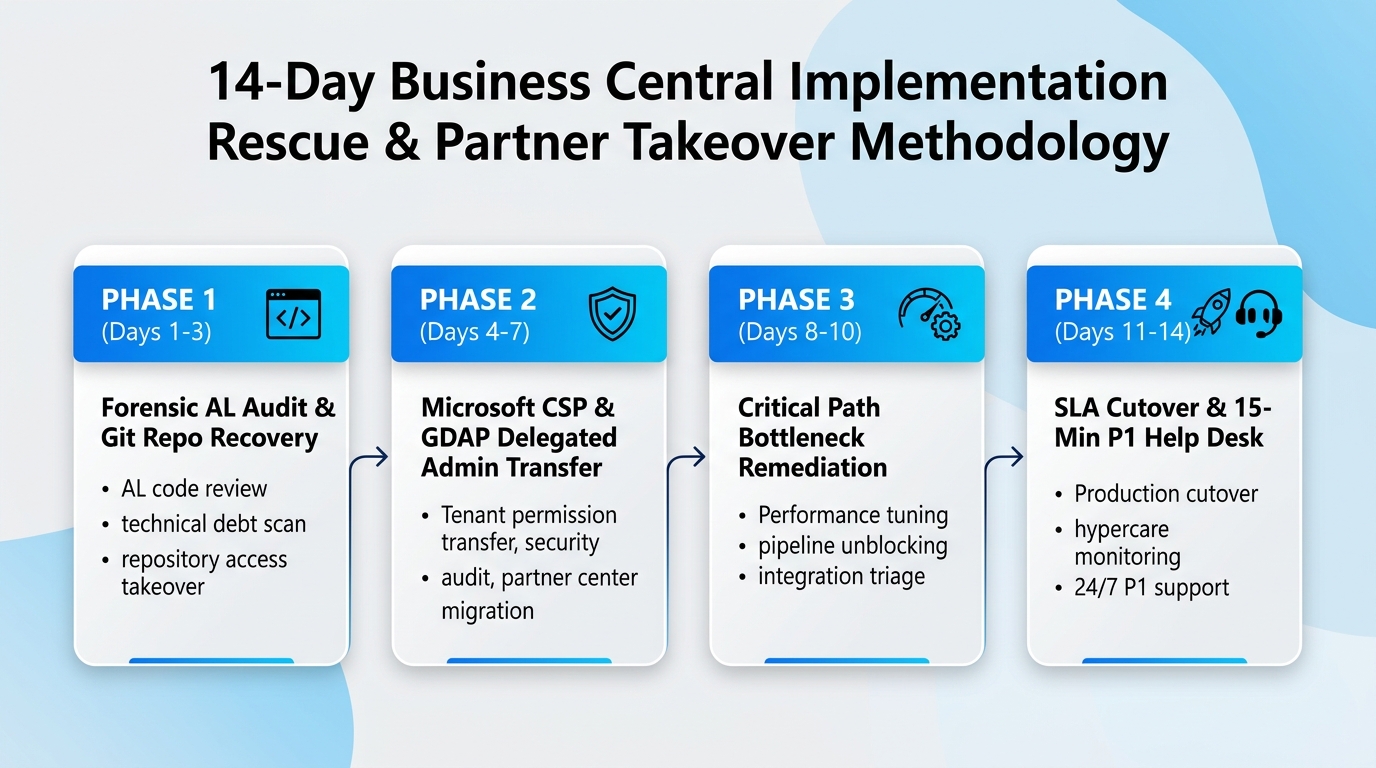
Switching your Microsoft Cloud Solution Provider (CSP) and enterprise ERP support partner does not touch your tenant database, modify user passwords, or require a weekend cutover. Microsoft's cloud architecture is specifically engineered to allow seamless partner transitions. Here is Allgrow's structured 14-day transition framework:
Phase 1 (Days 1–3): Forensic AL Audit & Private Repository Migration
We initiate a comprehensive code inspection across all installed extensions in your Business Central production and sandbox environments. We identify unmanaged technical debt, unindexed table keys, inefficient SQL queries, and event subscribers causing record-locking bottlenecks. Concurrently, we establish an isolated, private Azure DevOps Git repository under your organization's direct control, ensuring your business owns 100% of its custom code.
Phase 2 (Days 4–7): Microsoft CSP & GDAP Delegated Administration Transfer
Through the Microsoft Partner Center, we send a Granular Delegated Admin Privileges (GDAP) relationship request with zero-trust security scoping. You approve the link in your Microsoft 365 Admin Center with one click. Your Business Central and Power Platform user licenses are seamlessly mapped to Allgrow's Tier-1 Cloud Solution Provider (CSP) agreement—guaranteeing consolidated monthly billing, license seat flexibility, and direct Microsoft escalation pathways with zero downtime.
Phase 3 (Days 8–10): High-Friction Operational Bottleneck Remediation
We do not spend weeks writing endless theoretical assessment decks. Our senior architects immediately tackle your team's top three daily operational pain points:
- Bank Feed & Reconciliations: Reconfiguring native Envestnet Yodlee or Plaid feeds and payment reconciliation rules so daily cash flow reconciles in minutes.
- Posting Deadlock Elimination: Disabling or refactoring high-latency custom triggers on sales and purchase posting routines.
- Automated AP & Approval Flows: Deploying lightweight Power Automate flows with Microsoft Teams adaptive cards for mobile purchase approvals.
Phase 4 (Days 11–14): SLA Cutover & Dedicated Help Desk Onboarding
Your entire finance, operations, and warehouse staff receive direct access to Allgrow's dedicated US Eastern Time help desk. Every support ticket is governed by a guaranteed 15-minute P1 critical emergency SLA and under-one-hour standard business response. Your team is officially liberated from slow partner queues and empowered with responsive senior engineering support.
Is Your Business Central Implementation Trapped in Limbo?
Schedule a confidential 30-minute Partner Takeover Diagnostic. Our senior US architects will inspect your AL extensions, audit your licensing, and build a zero-downtime rescue roadmap.
5. Frequently Asked Questions (Partner Takeovers & ERP Rescues)
Can we switch Microsoft Business Central partners without reinstalling our system?
Yes, absolutely. Dynamics 365 Business Central Cloud runs on Microsoft's multitenant Azure architecture. Your partner is merely an authorized service provider linked to your Microsoft 365 tenant via Granular Delegated Admin Privileges (GDAP). Switching partners involves approving a new Microsoft Partner Center authorization link and reassigning your CSP license subscription. Your database, setup data, users, and historical transactions remain 100% intact with zero downtime.
What happens if our current partner refuses to release our custom AL code?
As the tenant administrator, you possess statutory and administrative ownership of all intellectual property deployed to your production environment. Through the Business Central Admin Center, our architects can download deployed extension packages (.app files) or decompile symbol packages if raw source files are withheld. During onboarding, we migrate all custom logic into a private, client-owned Azure DevOps Git repository so you are never held hostage again.
How does an implementation rescue prevent month-end close delays?
Month-end close bottlenecks are typically caused by unapplied customer/vendor entries, improper inventory costing setup (such as unadjusted average cost batches), and table-locking conflicts during general journal postings. During an implementation rescue, we reconfigure automatic inventory cost adjustment routines, establish automated bank reconciliation matching rules, and tune Job Queue schedules to run heavy valuation batches outside business hours.
What support SLA response times does Allgrow provide after takeover?
Allgrow guarantees a 15-minute response SLA for Priority 1 (critical business outage) incidents under our active Enterprise Support agreements, and under one hour during standard US Eastern business hours. Tickets are routed directly to named Senior Solution Architects—never unmonitored ticket dispatchers or junior offshore queues.