Microsoft has introduced a small but useful usability improvement in Business Central 29 Preview: lookups can now show records that you have recently used or accessed.
The new Recent option can make data entry faster when you repeatedly work with the same customers, vendors, items, or other records.
For example, if you regularly select the same items on sales or purchase documents, you can access those recently used records directly from the lookup instead of searching for them again.
Note: Business Central 29.0 is currently a public preview release, so features may change before general availability.
How Lookups Work in Business Central
In Business Central, the TableRelation property is commonly used to define relationships between tables.
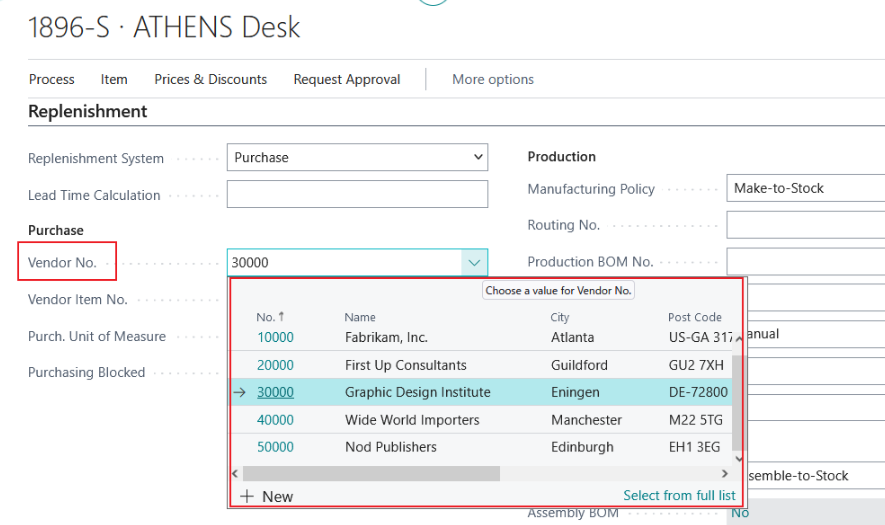
For example, the Vendor No. field on the Item Card can be related to the Vendor table. Users can then open the lookup and select the required vendor.
The columns displayed in a lookup are usually controlled by the DropDown field group. If no DropDown field group is defined, Business Central displays the primary key.
This type of lookup is used throughout Business Central, including:
- Vendor No. on the Item Card
- Country/Region Code on the Customer Card
- Item No. on Sales Order lines
- Customer No. on sales documents
Previously, when users opened these lookups, they generally had to search or scroll through the available records to find the required value.
Recently Used Records in Business Central 29
Business Central 29 Preview introduces a Recent option in lookups.
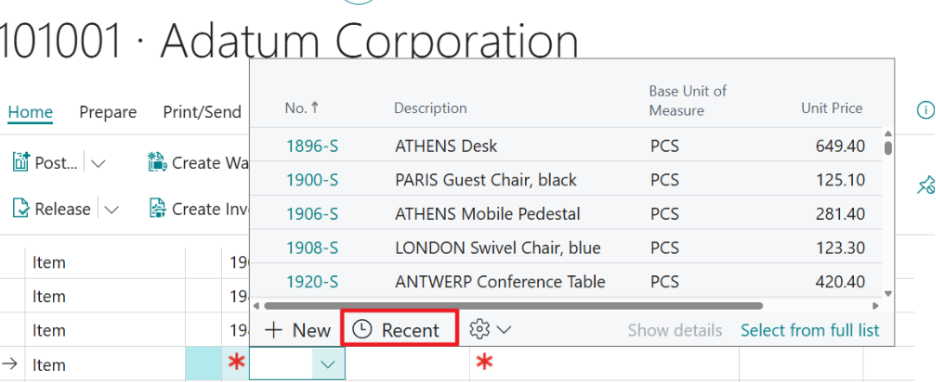
When you open a lookup, you can select Recent to see records that you have recently accessed. This provides a quicker way to select records that you work with frequently.
For example, suppose you are working with the same item several times during the day. After using that item, it can appear in the Recent section of the Item lookup.
The next time you need the same item, you can open the lookup, select Recent, and choose the item without searching for it again.
If there are no recently used records, the Recent list will be empty.
You can also switch back to the normal lookup and use Search whenever you need to find another record.
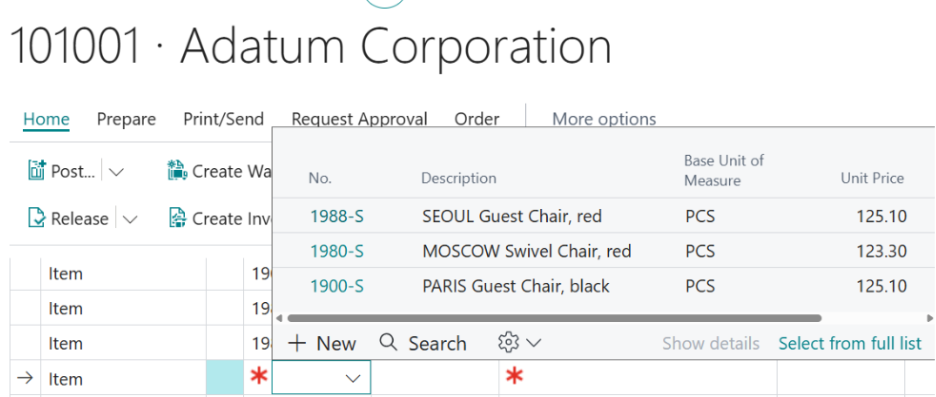
Recent Records Are Not Page-Specific
One interesting aspect of this feature is that recent records are maintained at the table level, rather than being limited to a specific page.
For example, if you recently selected an item from a Sales Order, that item can also appear in the Recent section when you open the Item lookup from another page, such as a Purchase Order.
This means the recent record is not limited to the page where you originally selected it. The same record can be available through the Recent lookup in other areas where the same table is used.
Why This Is Useful
This is a relatively small change, but it can make everyday data entry more efficient.
Users who repeatedly work with the same customers, vendors, items, or other records can select them from Recent instead of searching for the same records each time.
The existing lookup and search functionality remains available, so this feature does not change the standard lookup workflow. It simply provides another, quicker way to access records that you have recently worked with.
For users who spend a significant amount of time entering transactions, reducing repetitive searching can make common Business Central workflows more convenient.
What Business Central 29 Means for Customizations
For organizations running customized Business Central environments, new platform features are also worth reviewing from a development perspective.
A new standard feature can sometimes eliminate the need for a custom workaround or extension. Before developing additional functionality, it is worth checking whether a newer Business Central release already addresses the requirement.
This is particularly important for organizations that maintain custom Business Central solutions. New platform capabilities can provide opportunities to simplify existing customizations and reduce unnecessary custom code.
Testing Business Central 29 Preview
Organizations that want to evaluate the new functionality before upgrading a production environment can test Business Central 29 Preview in an appropriate Business Central online sandbox environment.
Testing the feature alongside existing configurations and extensions can also help identify any potential impact on customized Business Central solutions before a production upgrade.
Because this is a preview release, functionality and behavior may change before Business Central 29 becomes generally available.
Key Takeaways
- Business Central 29 Preview introduces a Recent option in lookups.
- Recently accessed records can be selected without searching for them again.
- The feature can be useful when users repeatedly work with the same customers, vendors, items, or other records.
- Recent records are maintained at the table level, rather than being limited to a specific page.
- The standard lookup and Search functionality remains available.
- Business Central 29.0 is currently a public preview, so the feature may change before general availability.
Need Help With Business Central Development?
Business Central updates can introduce useful standard functionality, but organizations may still need extensions, integrations, workflows, or custom functionality to support their specific business processes.
Allgrow provides Dynamics 365 Business Central development, customization, integration, and support, helping businesses extend Business Central while keeping their customizations maintainable and ready for future Microsoft updates.
If you are evaluating a Business Central upgrade, modernizing existing customizations, or looking for functionality that standard Business Central does not provide, Allgrow can help assess the requirement and determine the right approach.
