
Connecting Claude to Dynamics 365 Business Central via Model Context Protocol (MCP): Enterprise Architecture & Secure Tool Implementation
A definitive architectural guide to bridging Anthropic Claude with Microsoft Dynamics 365 Business Central using the Model Context Protocol (MCP). How to configure zero-trust Microsoft Entra ID authentication, implement secure JSON-RPC tool registries, query real-time OData ledgers, and maintain airtight SOX compliance.

1. Executive Summary: The Model Context Protocol (MCP) Paradigm
As enterprise organizations integrate cognitive artificial intelligence into daily operations, traditional approaches to enterprise resource planning (ERP) chat interfaces have revealed substantial limitations. Hard-coded conversational bots and custom application wrappers suffer from rigid intent routing, maintenance overhead, and latency bottlenecks.
The Model Context Protocol (MCP) is an open standard that allows Claude to securely discover, inspect, and execute enterprise tools in Microsoft Dynamics 365 Business Central. By authenticating through Microsoft Entra ID OAuth 2.0, Claude queries live general ledgers, checks warehouse stock, and drafts customer quotes via standard REST and OData APIs without custom chat UIs.
By decoupling the cognitive reasoning engine (Claude) from the underlying application logic and database schema via standard JSON-RPC protocol messages, MCP empowers financial analysts, controllers, and supply chain executives to ask complex multi-entity questions and receive sub-second, verifiable answers backed by live ledger entries.
2. Why MCP Outperforms Traditional ERP Chatbots & Custom Copilots
Enterprise teams frequently ask why an organization should implement an MCP server rather than relying solely on generic chat extensions or building custom point-to-point connectors. The answer lies in standardization, schema-driven tool discovery, and zero client lock-in.
| Capability Dimension | Legacy Point-to-Point Chatbots | Native Copilot Studio Agents | Anthropic Claude + MCP Server |
|---|---|---|---|
| Tool Discovery | Hardcoded API mappings requiring code updates per intent. | Microsoft Power Platform connector catalogue bindings. | Dynamic JSON-RPC Schema Registry; LLM introspects capabilities on load. |
| Reasoning Depth | Limited keyword or regex-based pattern matching. | Standard conversational summarization with grounded search. | Deep Multi-Step Tool Chaining (can inspect PO, compare vendor ledger, and check inventory in one prompt). |
| Client Portability | Locked to single custom web portal or iframe. | Restricted to Microsoft Teams and Power Pages. | Universal: Operates across Claude Desktop, developer IDEs, custom enterprise portals, and autonomous agents. |
| Governance & Guardrails | Manual API token management in code. | Data Loss Prevention (DLP) and Entra ID RBAC. | Zero-Trust Gateway: Granular read/write confirmation envelopes, audit logs, and rate caps. |
3. The 4-Layer Enterprise Architecture Topology
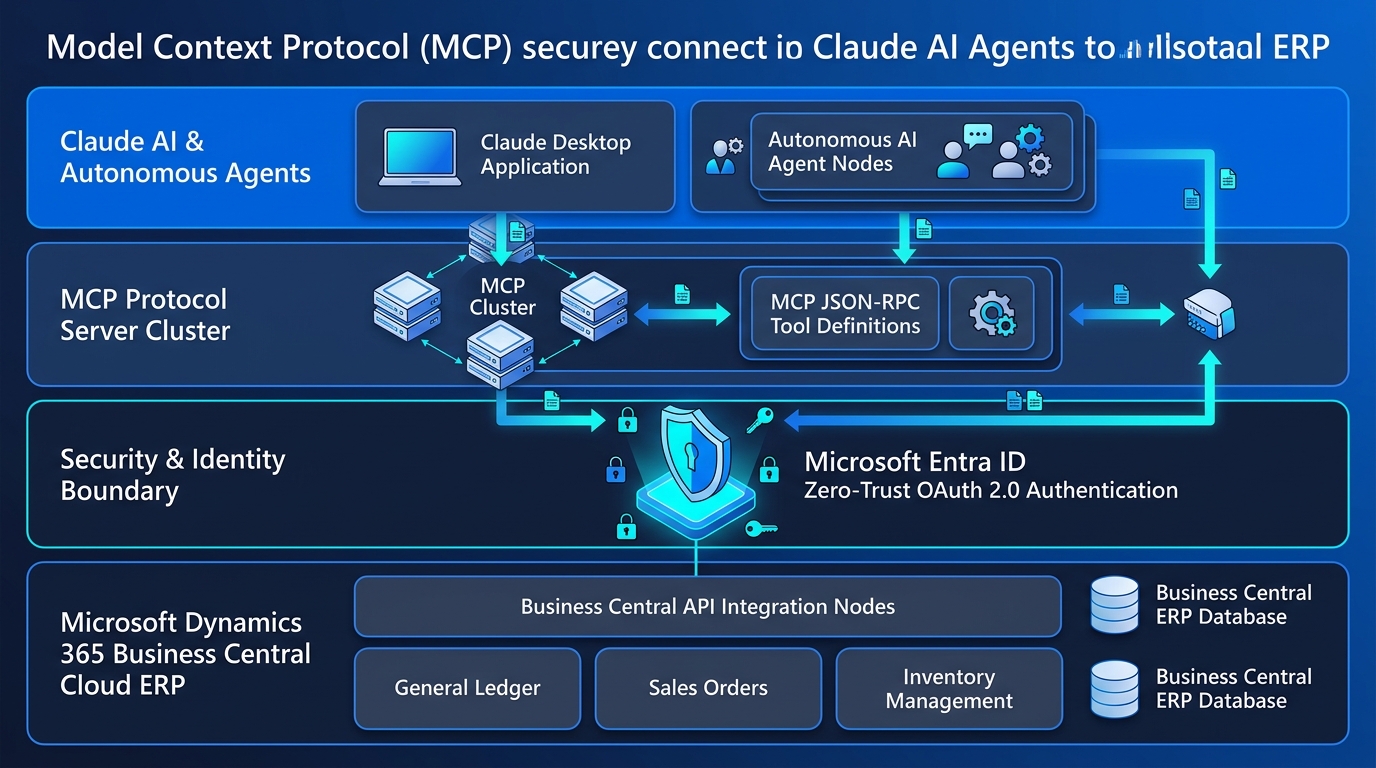
A production-grade implementation of Claude and Dynamics 365 Business Central requires a hardened, zero-trust infrastructure that isolates authentication credentials and enforces strict role-based access control (RBAC).
Client Layer (Claude)
The interaction surface—whether Claude Desktop, an executive terminal, or an autonomous backend orchestrator. Claude communicates solely via JSON-RPC protocol over standard input/output (stdio) or Server-Sent Events (SSE).
MCP Protocol Server
A lightweight, containerized microservice deployed in Azure Container Apps. It registers tool schemas, enforces rate limits, validates input parameters, and orchestrates downstream ERP calls.
Entra ID Security Boundary
Zero credentials reside on the client machine. The MCP server negotiates OAuth 2.0 bearer tokens with Microsoft Entra ID using Managed Identity or App Registrations with least-privilege API scopes.
Business Central ERP Core
The cloud transactional backbone. Standard V2.0 REST endpoints and custom AL API pages deliver high-performance ledger data, inventory levels, and order processing with sub-second response times.
4. Implementing the Business Central MCP Tool Registry
The Model Context Protocol operates by exposing structured "Tools" to the language model. When a user asks an enterprise question, Claude analyzes the prompt against the registered tool schemas, selects the optimal tool, formats the required parameters, and submits the call.
Below are the four mission-critical MCP tools deployed in enterprise Business Central environments:
5. Enterprise Governance, SOX Compliance & Guardrails
Connecting an autonomous reasoning model to an enterprise ERP system introduces legitimate governance concerns regarding data integrity, unauthorized changes, and auditability. At Allgrow Technologies, our MCP deployments follow strict architectural safeguards:
- Read-Only Default Boundaries: By default, all tools registered with Claude are strictly read-only. Analytical tools cannot mutate records, insert ledger entries, or alter posted vouchers.
- Two-Phase Write Confirmation (Human-in-the-Loop): Any tool that generates transactional data (such as drafting quotes or customer journals) produces a staged entity with an explicit confirmation payload. Claude must present the staged entity to the user, and execution requires user verification before the ERP accepts the transaction.
- Audit Logging & Session Telemetry: Every JSON-RPC request and response is recorded with correlation IDs into Azure Log Analytics. Compliance auditors can reconstruct the exact prompt, the tool called, the parameters passed, and the ERP response timestamp.
- Token Bucket Rate Limiting: To safeguard Business Central environments against OData request throttling (429 Too Many Requests), the MCP server enforces an internal token-bucket rate limiter that caps concurrent requests per user session.
6. 4 High-Impact Enterprise Use Cases
Organizations implementing Claude with Business Central experience dramatic efficiency gains across operations:
1. Instant Financial Close Analysis
Controllers can prompt: "Compare operating expense variances between Q3 and Q4 across Department 10 and 20, and list any GL account with more than 15% discrepancy." Claude queries the GL entries tool, calculates the deltas, and delivers formatted variance tables in seconds.
2. Wholesale Customer Fulfillment Inquiries
Account managers can ask: "Customer 10400 wants 500 units of SKU 70010. What is available across Chicago and Dallas, and what is their current credit hold status?" Claude chains inventory lookup and customer balance tools into a single coherent briefing.
3. Automated Vendor Payment Audit
AP teams query: "Find all open purchase invoices with due dates within 7 days where the payment discount date has not expired." Claude surfaces eligible discounts, preventing missed terms and late fees.
4. Real-Time DBA Performance Triage
IT teams ask: "Did any background job queues fail during the midnight batch, and were there SQL table locks on the Sales Line table?" Claude inspects Azure telemetry and pinpoints offending AL codeunits immediately.
7. Frequently Asked Questions
Key architectural and security questions regarding Claude and Business Central Model Context Protocol deployments:
What is the Model Context Protocol (MCP) in the context of Dynamics 365 Business Central?
The Model Context Protocol (MCP) is an open standard developed by Anthropic that enables large language models like Claude to safely discover, inspect, and execute tools exposed by external systems. When integrated with Business Central, MCP allows Claude to securely query real-time general ledger balances, check inventory across warehouse locations, and draft customer sales quotes via standard Microsoft Entra ID authenticated REST and OData APIs without requiring custom chatbot UI development.
How does MCP authenticate securely with Microsoft Dynamics 365 Business Central?
Authentication relies on Microsoft Entra ID (Azure AD) OAuth 2.0 client credentials or delegated user tokens. The MCP server operates as an authenticated proxy: it holds secure credentials within an enterprise key vault, verifies user permissions against Business Central security user groups and permission sets, and prevents direct credential exposure to the LLM client.
Can Claude write or post financial transactions directly into Business Central via MCP?
In enterprise deployments, write operations are strictly gated using human-in-the-loop validation and staging tables. While MCP can draft sales orders or inventory adjustment journals, direct posting to the General Ledger or releasing orders requires explicit multi-factor confirmation within Business Central or Power Automate approval flows to preserve SOX compliance and audit trails.
How does an MCP integration differ from Microsoft Copilot Studio?
Copilot Studio provides a managed conversational interface natively within Microsoft 365 and Teams. An MCP server provides a standardized, model-agnostic tool execution layer. This allows enterprise engineering and analytical teams using Claude Desktop, Cursor, or autonomous agent frameworks to interact with Business Central data directly in their development and analytical workflows with sub-second API execution.
What Business Central API endpoints are best suited for an MCP server?
Business Central Standard V2.0 REST APIs (such as customers, vendors, salesOrders, purchaseOrders, items, and generalLedgerEntries) provide optimal performance. For specialized fields or custom AL extensions, custom API pages exposed as OData V4 services are registered within the MCP tool registry.
8. Related Architecture & Support Resources
To explore complementary enterprise Microsoft and ERP automation frameworks, review our architectural guides: