

Executive Briefing: Why Power Automate Sprawl Threatens US Enterprises
Across distributed US enterprise environments—spanning multiple branch offices, remote departments, and distinct business units—Microsoft Power Automate has democratized process automation. However, when citizen developers connect automated cloud flows directly to enterprise SQL databases, Dynamics 365 Business Central, and proprietary file shares without governance oversight, substantial operational vulnerabilities emerge. Ungoverned automated workflows bypass corporate change controls, violate strict US data handling mandates such as SOC 2 Type II and HIPAA, and result in severe licensing cost spikes during annual Microsoft true-ups. Establishing a formalized Center of Excellence (CoE) and robust Data Loss Prevention (DLP) architecture is essential for scaling automation without compromising regulatory compliance or enterprise security.
1. The Silent Sprawl: Shadow Automation Across Distributed US Operations
In modern mid-market and enterprise organizations operating across North American time zones, citizen developers often create automated flows inside Microsoft's Default environment. Because every licensed Microsoft 365 user receives base automated flow capabilities, departmental power users naturally begin building departmental tools to solve immediate operational bottlenecks—such as emailing invoice copies, triggering vendor notifications, or exporting customer lists.
While individual intent is productive, unmonitored citizen automation rapidly creates three critical enterprise risks:
- Orphaned Critical Workflows: When a key employee departs the organization, their automated personal flows often cease functioning or experience broken connection references. If that flow was quietly powering critical warehouse purchase order notifications or month-end financial reconciliations, operational disruption immediately ensues.
- Uncontrolled Data Exfiltration: Without strict DLP connector boundaries, a well-meaning user can configure a trigger that reads confidential vendor records from Dynamics 365 Business Central or Dataverse and routinely drops copies into consumer-grade cloud storage, external webhooks, or personal email accounts.
- Unbudgeted Licensing Escalation: Cloud flows designed with polling triggers or infinite recursion loops can consume millions of Power Platform API requests. When organizations cross their monthly tenant limits, IT executives face surprise cloud overage invoices during licensing true-ups.
2. Multi-Tier Environment Strategy: Segregating Personal vs. Production Workloads
The cornerstone of Power Automate governance is retiring the Default environment as a business-critical processing center. In a mature Microsoft Power Platform deployment, the Default environment should be treated strictly as an isolated personal productivity sandbox with minimal connector permissions.
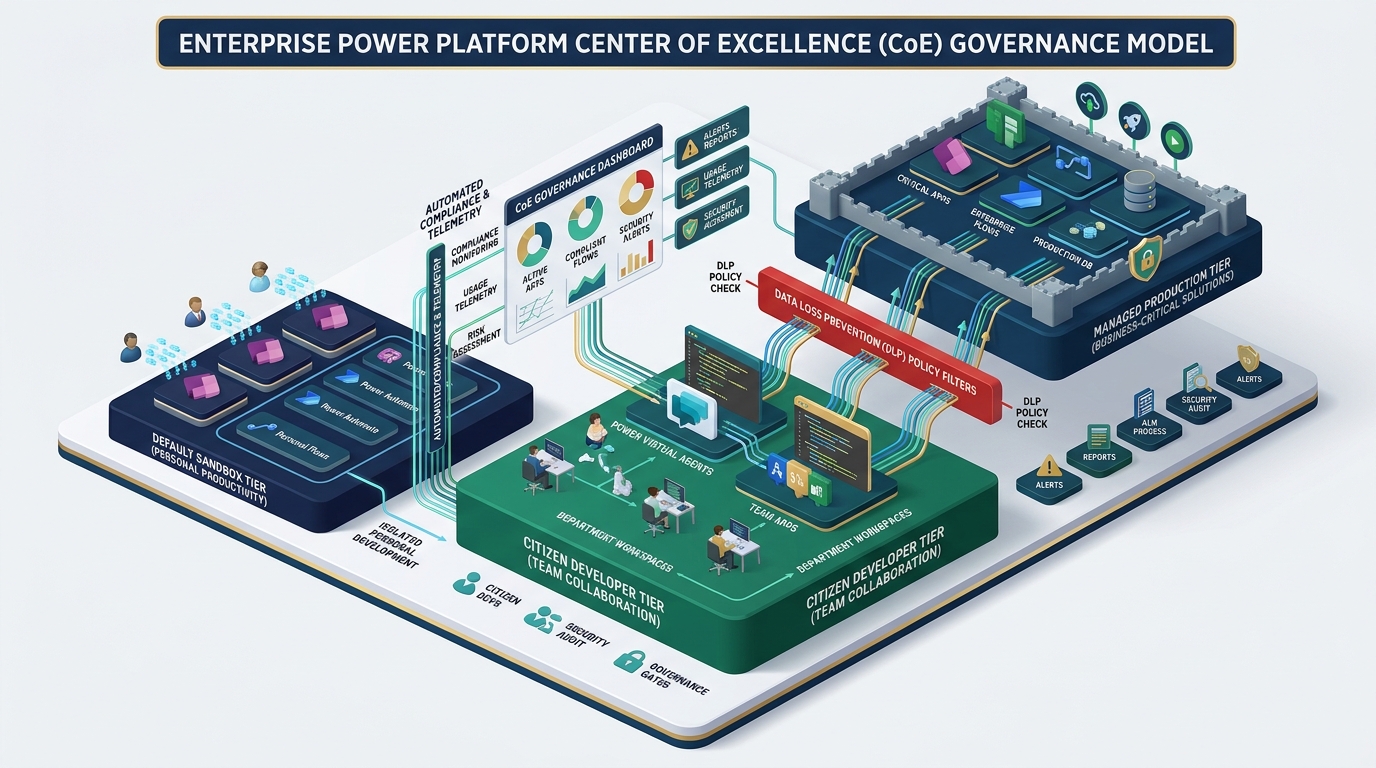
Enterprise governance frameworks enforce an explicit three-tier environment topology:
- Default Sandbox Environment (Personal Productivity Only): Accessible to all employees. Connector policies restrict workflows to basic Microsoft 365 services (such as Outlook, OneDrive personal files, and Microsoft Teams notifications). Enterprise connectors—such as SQL Server, Dynamics 365 Business Central, Salesforce, and custom REST HTTP endpoints—are strictly blocked.
- Dedicated Departmental Development Environments: Provisioned for specific business units (such as Finance, Supply Chain, or Human Resources). Citizen developers work within controlled solution packages with defined Application Lifecycle Management (ALM) boundaries and source-controlled solution export processes.
- Managed Production Environments: Locked down with strict Service Principal authentication and security group access. No individual user possesses direct editing permissions in production. All cloud flows are deployed through automated Azure DevOps or GitHub enterprise release pipelines using managed solutions.
3. Data Loss Prevention (DLP) Policy Architecture & Connector Classification
Data Loss Prevention policies in the Power Platform Admin Center enforce non-negotiable architectural boundaries around where enterprise data can flow. By classifying connectors into explicit data groups, administrators mathematically prevent sensitive corporate records from touching unapproved endpoints.
| DLP Group | Permitted Connectors | Restricted Combinations | Enterprise Governance Objective |
|---|---|---|---|
| Business Data Group | Dynamics 365 Business Central, Dataverse, SQL Server, SharePoint Corporate, SAP ERP | Cannot be paired with any Non-Business connector within the same flow trigger or action chain | Protects sensitive ERP, customer PII, and financial records within verified corporate databases |
| Non-Business Group | Personal Outlook, Google Drive, Dropbox, Social Media, Public RSS Feeds | Isolated entirely from Business data connectors | Allows personal day-to-day productivity while eliminating accidental corporate data leaks |
| Blocked Group | Generic HTTP Webhooks, Uncertified Third-Party APIs, Unapproved Cloud Databases | Completely disabled across the environment | Prevents untracked external egress channels and unauthorized shadow cloud integrations |
For US organizations subject to compliance frameworks such as SOC 2 Type II, HIPAA, or GLBA, connector action filtering should be leveraged. For instance, while the SharePoint connector may be permitted in a Business group, administrators can selectively disable specific write actions or restrict external anonymous link creation to maintain audit readiness.
4. Deploying the Microsoft Center of Excellence (CoE) Starter Kit
Manual administration of thousands of cloud flows across hundreds of users is impossible. The Microsoft Power Platform Center of Excellence (CoE) Starter Kit provides the automated telemetry, governance dashboards, and compliance notification loops necessary to run proactive oversight.
A production-grade CoE implementation provides four core operational capabilities:
- Automated Inventory Synchronization: Daily synchronization flows catalog every cloud flow, desktop robotic process automation (RPA) script, connection reference, and creator identity across all tenant environments into a centralized Dataverse repository.
- Executive Power BI Governance Dashboards: Senior leadership gains immediate visibility into active vs. dormant flows, top connector utilization, flow failure rates, and departmental adoption trends.
- Automated Compliance Inactivity Workflows: When a workflow has not executed for 90 consecutive days, the CoE automation engine sends an adaptive card to the flow maker via Microsoft Teams requesting business justification. If unanswered, the workflow is automatically archived, reducing cloud clutter and security attack surface.
- Orphaned Workflow Reassignment: When an active flow creator's Entra ID (Azure AD) account is disabled during employee offboarding, the system flags the orphaned flows and triggers an administrative transfer workflow to the departing employee's direct manager.
5. Aligning Automation with US Regulatory Standards: SOC 2, HIPAA & NIST
Automated workflows represent programmatic business logic that must adhere to the same internal controls as customized ERP applications. During an annual SOC 2 Type II audit or healthcare HIPAA compliance review, external auditors scrutinize how automated flows handle data in transit and verify who possesses execution authorization.
To ensure audit-proof Power Automate operations, enterprise IT teams must enforce three architectural controls:
- Service Principal & Managed Identity Execution: Mission-critical business workflows must never execute under individual named user credentials. Utilizing Microsoft Entra ID Service Principals ensures that execution permissions are decoupled from human turnover and subject to strict conditional access policies.
- Secure Input/Output Masking: For flows handling sensitive records—such as employee Social Security numbers, banking details, or protected health information (PHI)—administrators must enable secure inputs and secure outputs on sensitive flow actions. This prevents plain-text values from being recorded in execution run history logs.
- Customer Lockbox & Tenant Isolation: Enabling Tenant Isolation ensures that external inbound and outbound connections are restricted to trusted partner tenants, stopping unauthorized guest accounts from initiating data movements into outside clouds.
6. Power Automate Licensing Governance: Process Licenses vs. User Plans
Optimizing Microsoft Power Automate expenditures requires understanding the operational difference between per-user licensing models and per-process capacity allocation:
Power Automate Premium (Per User): Best suited for knowledge workers building individual desktop automations or interactive cloud flows. However, licensing hundreds of occasional users can become cost-prohibitive.
Power Automate Process License (Formerly Per Flow): Assigns dedicated execution capacity to a single high-volume business-critical flow, regardless of how many employees benefit from its automated outputs. For organizational workflows such as ERP data synchronization or automated multi-tier approval routing, the Process licensing model offers predictable, centralized budget management and superior total cost of ownership (TCO).
7. Phased Implementation Roadmap for Enterprise CoE Adoption
Transitioning an enterprise from uncontrolled automation sprawl to structured governance requires a measured, collaborative approach that empowers departmental innovation without stifling productivity.
| Implementation Phase | Time Horizon | Key Deliverables | Success Milestone |
|---|---|---|---|
| Phase 1: Discovery & Telemetry | Weeks 1 – 3 | Tenant inventory audit, CoE Starter Kit deployment, connector usage baseline | 100% visibility of active flows, makers, and high-risk connectors |
| Phase 2: DLP Containment | Weeks 4 – 6 | Environment segregation, default sandbox lockdown, business vs. non-business policies | Zero unmonitored ERP connectors in the default environment |
| Phase 3: ALM & Ownership | Weeks 7 – 9 | Service Principal transition, automated orphan detection, solution package standards | Key operational workflows decoupled from individual employee accounts |
| Phase 4: Optimization & Scaling | Weeks 10 – 12 | Process license rightsizing, maker training academies, executive KPI reporting | Predictable licensing budget and accelerated time-to-value for business units |
8. Frequently Asked Questions (FAQ)
If rolled out abruptly without assessment, yes. That is why professional Power Platform governance begins with a non-blocking impact analysis using the CoE Starter Kit. By analyzing historical flow telemetry, administrators can identify every active flow that would be affected by proposed DLP boundaries and guide users to appropriate departmental environments before policy enforcement is activated.
Without governance, poorly designed automated flows can flood Business Central OData and API web services with continuous polling loops, resulting in database locking, job queue congestion, and slow user response times. Proper governance enforces webhook triggers, batch API operations, and dedicated service tier authentication to ensure ERP stability.
Yes. The CoE Starter Kit and modern Power Platform Admin Center provide centralized monitoring for attended and unattended desktop flows, including machine group management, credential vaulting via Azure Key Vault, and execution failure alerting across all on-premises data gateways.
Best-practice architecture requires that critical flows reside inside solutions owned by a Service Principal or a designated Microsoft 365 Security Group rather than an individual. For personal productivity flows, the CoE Starter Kit automatically detects when a creator's Entra ID status changes to disabled and initiates an automated reassignment request to their supervisor.