Power Automate Flow – Send Email to All Team Members When a Quote is Activated
Have you ever wanted to notify everyone in a team automatically when something important happens in Dynamics 365?
Here’s a simple automation I built using Power Automate — when a Quote is activated, it sends an email to all the team members of the Quote Owner.
This is a small but very useful flow for sales and CRM users who want quick team updates without doing it manually.

Step by Step Explaination
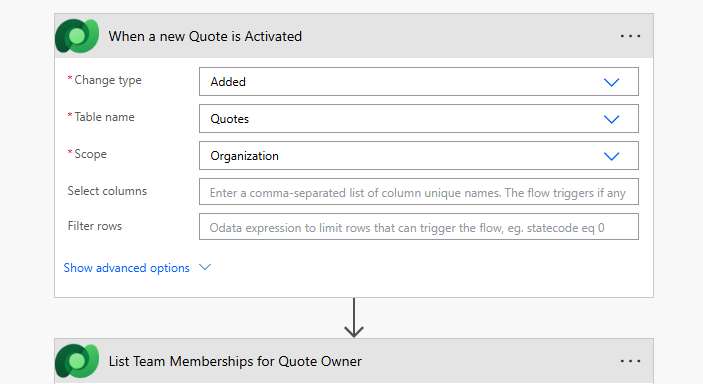
1.Trigger: When a Quote is Activated
Every flow starts with a trigger.
Here, I used the “When a row is added, modified, or deleted” trigger for the Quotes table.
This means whenever a Quote becomes Active, the flow will automatically start — no need to click anything
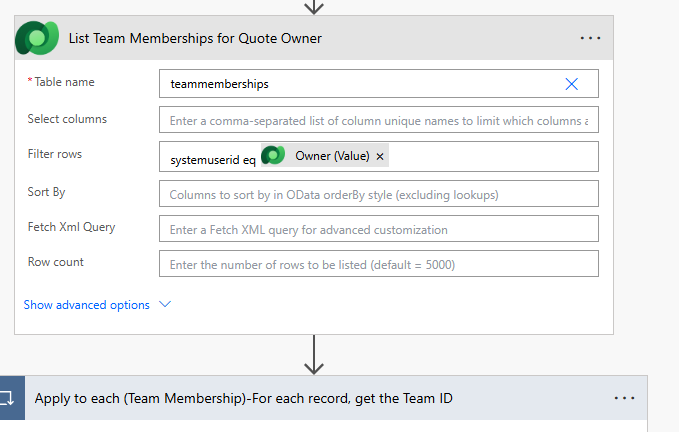
2.List Rows – Get Owner’s Teams
In Dynamics 365, a user can belong to multiple teams.
So, using the List rows action on the teammemberships table, I filtered the records where systemuserid eq Owner (Value)
This gives me all the teams that the Quote Owner is part of.
💡 Note: The teammemberships table sometimes doesn’t appear by default in Power Automate. You can add it manually as a custom table reference.
3. Apply to Each – Loop Through Teams
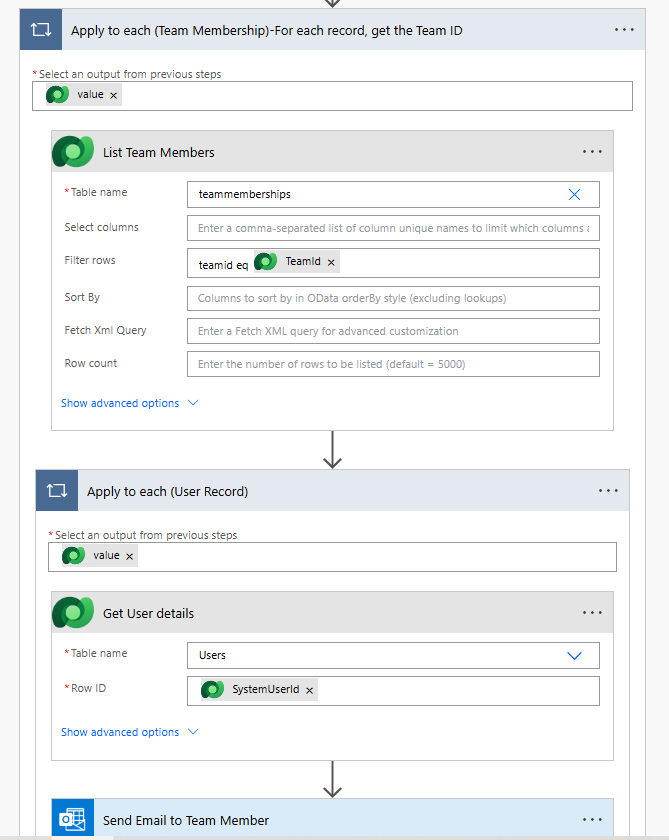
Now that I have the list of teams, I use an Apply to each loop.
This goes through every team one by one to find all the members inside each team.
4.List Rows – Get Team Members
Inside the loop, I again use the List rows action on the teammemberships table,
but this time I filter by: teamid eq Teamid
This step gives all the users (members) that belong to the current team.
5.Apply to Each – Loop Through Users
Once I have all the users, I need their details (like email).
So, I use another Apply to each loop to process each user record.
6.Get a Row by ID – Fetch User Details
Here, I use the Get a row by ID action on the Users table.
I pass the systemuserid to get the user’s details such as name and primary email address.
7.Send an Email (V2) – Notify the User
Finally, we send the email!
Final Flow Design
Trigger → Get Owner’s Teams → Loop (Teams) → Get Team Members → Loop (Users) → Get User Details → Send Email
Outcome
Now, whenever a Quote is activated, everyone in the Quote Owner’s team gets notified instantly — keeping your sales team informed and connected, all without manual effort.
This small flow can make a big difference in daily CRM operations.
For more details like this please follow our company LinkedIn page where you will get all the new updates
every week:
https://www.linkedin.com/company/allgrow-technologies-pvt-ltd/mycompany/
or you can write us at contact@allgrowtech.com
-By Goli Sai Vamsi Reddy
Author
Leave a comment
Your email address will not be published
