Customer Self-Service Portal
Allow customers to view quotations, orders, invoices, shipments, payment history, support requests, and account information securely online.

Modern businesses cannot rely solely on emails, phone calls, and spreadsheets to manage customer and vendor interactions. Our Customer and Vendor Portal solutions provide secure, self-service digital experiences built on the Power Platform that simplify collaboration, improve transparency, reduce administrative work, and seamlessly integrate with Microsoft Dynamics 365 and Business Central.
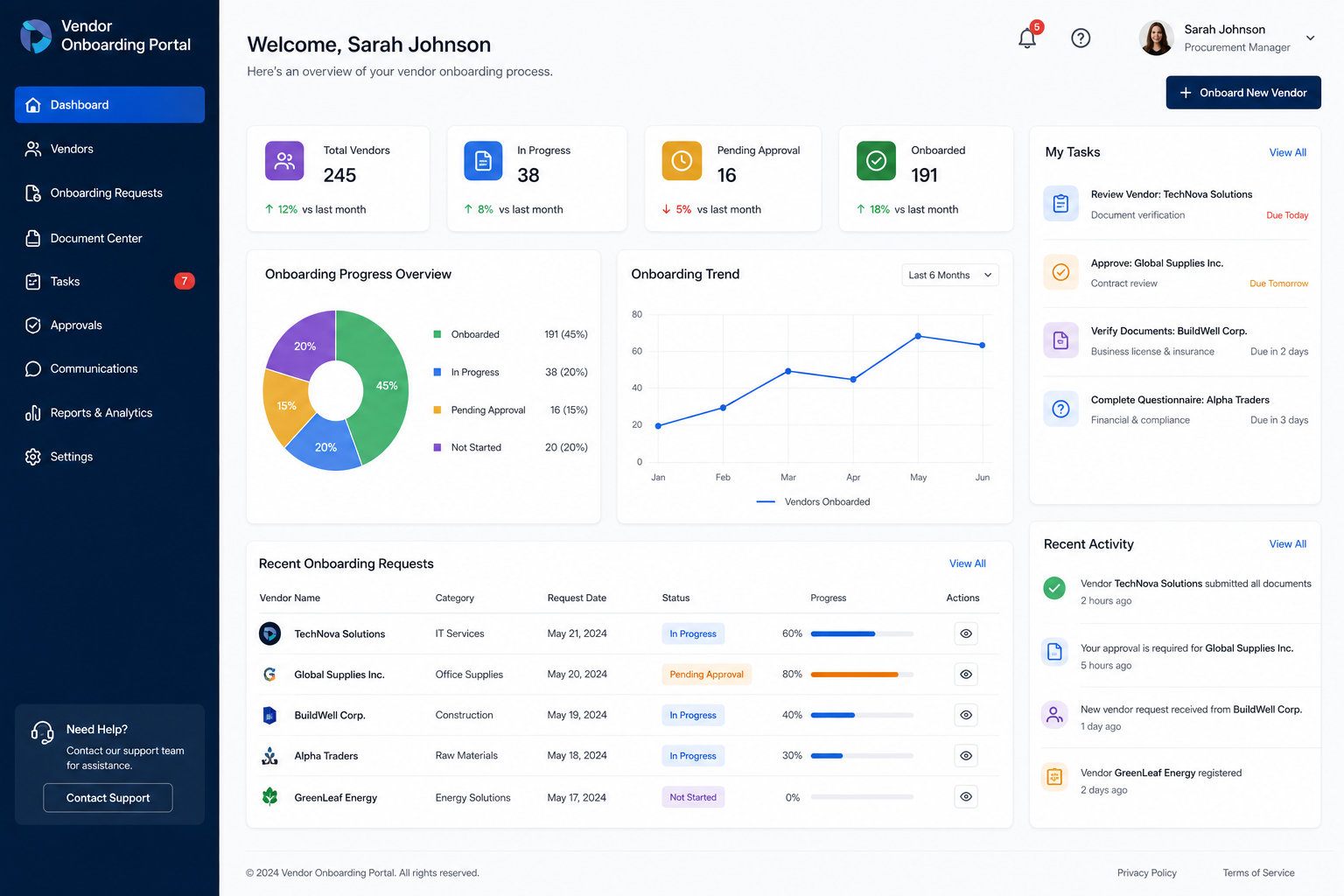
Organizations often manage customer requests, purchase orders, invoices, quotations, vendor onboarding, document sharing, and support activities through emails and phone calls. As business grows, these manual processes become increasingly difficult to manage, leading to communication delays, duplicated work, document errors, and limited visibility for both internal teams and external stakeholders. Customers expect instant access to order information, invoices, shipment updates, and support services, while vendors require faster procurement processes, payment visibility, and simplified collaboration.
Manual Collaboration Bottlenecks
Secure self-service experiences engineered to streamline customer collaboration and vendor onboarding.
Allow customers to view quotations, orders, invoices, shipments, payment history, support requests, and account information securely online.
Enable vendors to manage purchase orders, submit invoices, update company records, monitor payments, and upload compliance documents.
Custom responsive web applications built with Power Pages, Power Apps, and Power Automate to deliver secure external digital experiences.
Share contracts, invoices, certificates, and onboarding forms securely with role-based access control and encrypted storage.
Automate approvals, onboarding verification, document submissions, purchase requests, and customer notifications via Power Automate.
Synchronize customer accounts, invoices, inventory availability, and shipping statuses directly with Microsoft Dynamics 365 Business Central.
How our Power Platform architecture routes external inquiries, automates approvals, and synchronizes transactions with Business Central.
We build with Microsoft enterprise cloud standards to ensure maximum security, scalability, and seamless ERP integration.
Transform external interactions into efficient, scalable digital operations.
Provide customers with instant access to business information without relying on manual communication or support calls.
Enable suppliers to work more efficiently through streamlined digital procurement, invoicing, and document sharing.
Automate repetitive communication, document exchange, approvals, and transaction processing using Power Automate.
Provide real-time transparency to external stakeholders and internal teams through connected enterprise systems.
Drastically reduce response times for quotations, purchase orders, vendor onboarding, and service requests.
Support rapidly growing customer and vendor networks through secure, cloud-based self-service portal platforms.
A structured engineering framework designed to deploy secure external portals with zero data leakage.
Map external collaboration bottlenecks, data requirements, security boundaries, and ERP touchpoints.
Design responsive Power Pages layouts, user roles, security profiles, and navigation structures.
Configure Power Apps data models, Power Automate approval workflows, and Business Central integrations.
Test role-based access control, authentication protocols, data privacy boundaries, and permission groups.
Simulate customer and vendor interaction scenarios, document uploads, and automated notification triggers.
Deploy portals into production, onboard external users, and introduce AI assistant enhancements.
At Allgrow, we develop secure customer and vendor portals that become an extension of your enterprise systems rather than standalone applications. By combining Microsoft Dynamics 365, Business Central, Power Platform, AI, cloud technologies, and custom software development, we create connected digital experiences that improve collaboration while reducing operational complexity. Every portal is designed around your business processes, ensuring customers, suppliers, and employees can work together more efficiently through a modern digital platform that scales with your business.
A Customer Portal is a secure online platform built on Power Pages where customers can view quotations, orders, invoices, shipments, support requests, payment information, and account details without contacting your team.
A Vendor Portal enables suppliers to manage purchase orders, submit invoices, upload compliance documents, monitor payments, update delivery schedules, and collaborate with procurement teams digitally.
Yes. Customer and Vendor Portals integrate seamlessly with Microsoft Dynamics 365 Business Central to synchronize business data, inventory levels, and financial ledgers in real time.
We implement enterprise-grade security using Microsoft Entra ID, role-based access control (RBAC), multi-factor authentication, and Dataverse security profiles to ensure users only access authorized records.
Whether you're building a customer self-service portal, vendor collaboration platform, procurement portal, or integrated business application, Allgrow can help you deliver secure, connected digital experiences that improve efficiency, transparency, and long-term business growth.
100% Free · No Obligation · Senior Architects