Case Study: Field Mobility & Power Platform

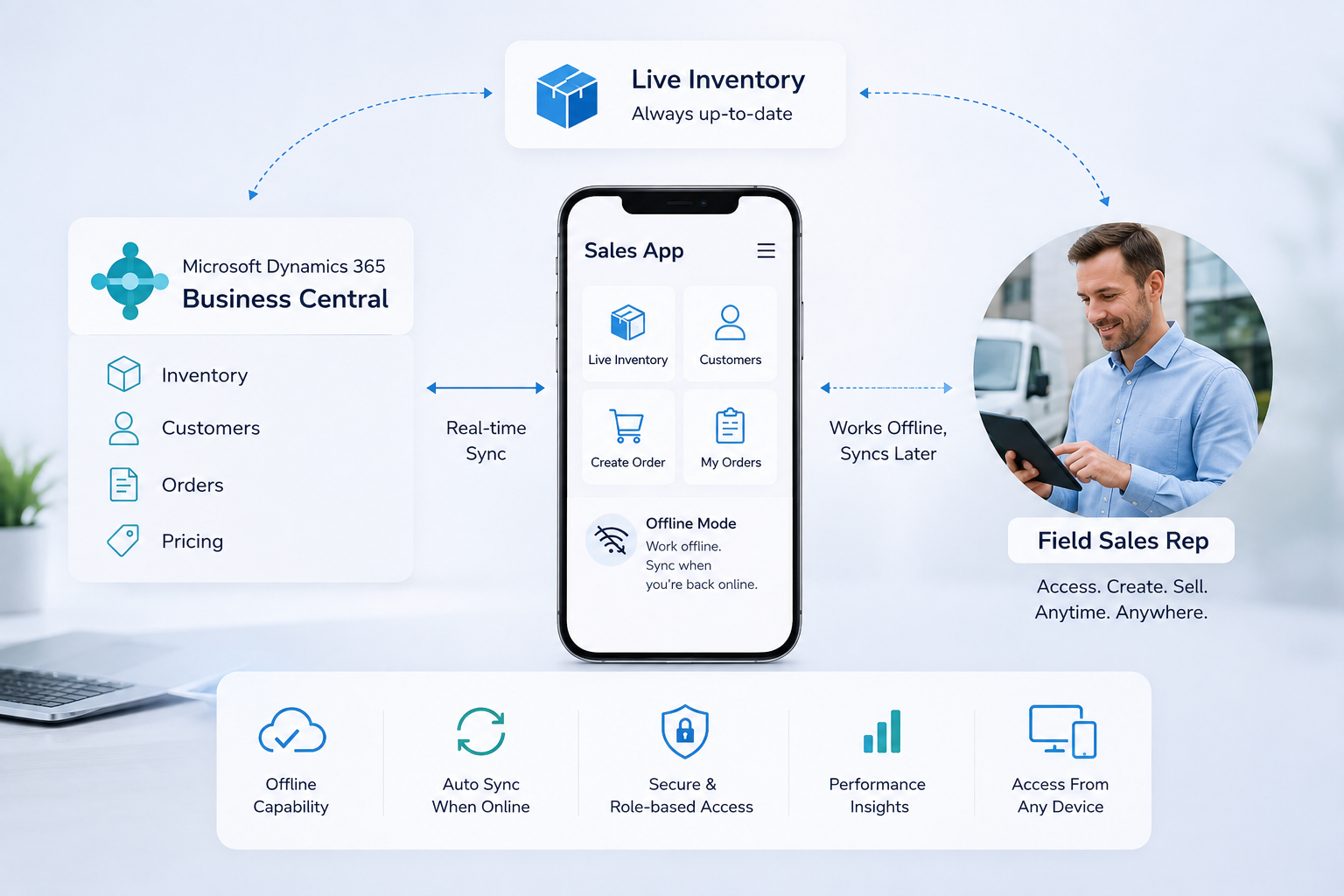
Giving Field Sales Teams Live Business Central Inventory Access — Even Offline

How Allgrow Technologies engineered an offline-first Microsoft Power Apps field mobility platform connected to Dynamics 365 Business Central and Power BI — featuring local catalog caching, pre-posting live stock validation, and role-based territory governance.

Giving Field Sales Teams Live Business Central Inventory Access — Even Offline
Enterprise Client B2B Wholesale Distributor
Core Technologies Power Apps + Dynamics 365 BC
Key Architecture Offline-First + Pre-Post Validation
Executive Telemetry Live Power BI Rep Dashboards
Field Operations Challenge

Enabling Field Reps in Low-Connectivity Customer Sites

A leading B2B distributor using Microsoft Dynamics 365 Business Central required a solution allowing field sales representatives to check stock availability and write orders directly while meeting with clients on-site. Crucially, many customer facilities had zero mobile reception or Wi-Fi access.

Field Rep Requirements

On-Site Sales Mobility Needs

  • Live Inventory Lookup: Direct visibility into warehouse stock levels and available-to-promise inventory during sales meetings.
  • Customer Registration & Order Creation: Onboard new retail accounts and submit confirmed sales orders directly from the field.
  • Zero-Connectivity Operation: The app must remain fully operational when completely offline in basements, warehouses, and rural areas.
Management & ERP Controls

Territory Governance & ERP Integrity

  • Territory Privacy & Security: Representatives maintain their own order books without accessing other sales reps' private customer records.
  • Pre-Posting Stock Validation: Prevent stale offline inventory from committing invalid reservations into Business Central upon reconnection.
  • Centralized Executive Oversight: Management required real-time visibility into rep activity, quotation conversion, and sales volume.
Engineering Architecture

Offline-First Power App with Automated Pre-Posting Validation

Allgrow Technologies engineered a custom Microsoft Power Apps mobile solution connected to Dynamics 365 Business Central, featuring automated local storage caching, intelligent sync mechanisms, and a Power BI performance dashboard.

🔄 OFFLINE ORDER LIFECYCLE & LIVE VALIDATION PIPELINE ● AUTOMATED PRE-POSTING VERIFICATION & SELF-HEALING
STAGE 01 BC Master Data Cache Customers, Tiers & SKUs
STAGE 02 Order Header & Barcode App ID, PO & Prod Sizes
STAGE 03 Zero-Signal Detected Floating Toast Warning
STAGE 04 In-Progress Local Stash Device SQLite / Dataverse
↓ Reconnection Handshake & Automatic Polling
STAGE 05 Network Restored Telemetry Heartbeat
STAGE 06 Pre-Posting ERP Check Type Safety & Live Stock
Outcome A: Clean Validation → Submitted Orders Ledger

Order is assigned an ERP ledger sequence, committed into Business Central sales order tables, and logged with exact transmission timestamps for instant warehouse picking.

⚠️ Outcome B: Schema Exception → Quarantine & 1-Tap Resubmit

Orders with schema mismatches (e.g. null quantities) isolate to Failed Orders. The app points reps to the faulty line item for mobile correction and instantaneous one-touch resubmission.

Camera Barcode / QR Scanning

Integrated mobile camera scanner (Scan Item) reads physical shelf barcodes, instantly adding correct SKUs without manual data entry.

Multi-Unit Packaging Specs

Full ERP item card mapping preserving wholesale packaging variants (e.g. 12x4.5OZ, 1x55LB) and pricing tiers (PT P1).

Live Connectivity Telemetry

Persistent global sync indicator dynamically alerts reps when roaming into dead zones and confirms cloud handshakes.

Local In-Progress Staging Stash

Zero-loss local buffer stashes transactions when offline, allowing reps to draft and manage multiple customer accounts.

Self-Healing Exception Triage

Failed orders quarantine with precise ERP failure diagnostics, allowing reps to correct line quantities and tap Resubmit in seconds.

Power BI Executive Oversight

Centralized dashboards tracking individual rep activity, order counts, territory velocity, and conversion trends.

Real System Implementation • 8 Production Mobile Screens

Inside the Field Sales App: From Shelf Barcode Scan to ERP Posting

Explore the production mobile interface engineered by Allgrow Technologies for B2B wholesale field sales reps. Review the complete transaction journey across account selection, offline interception, chronological audit trails, and one-tap self-healing schema correction.

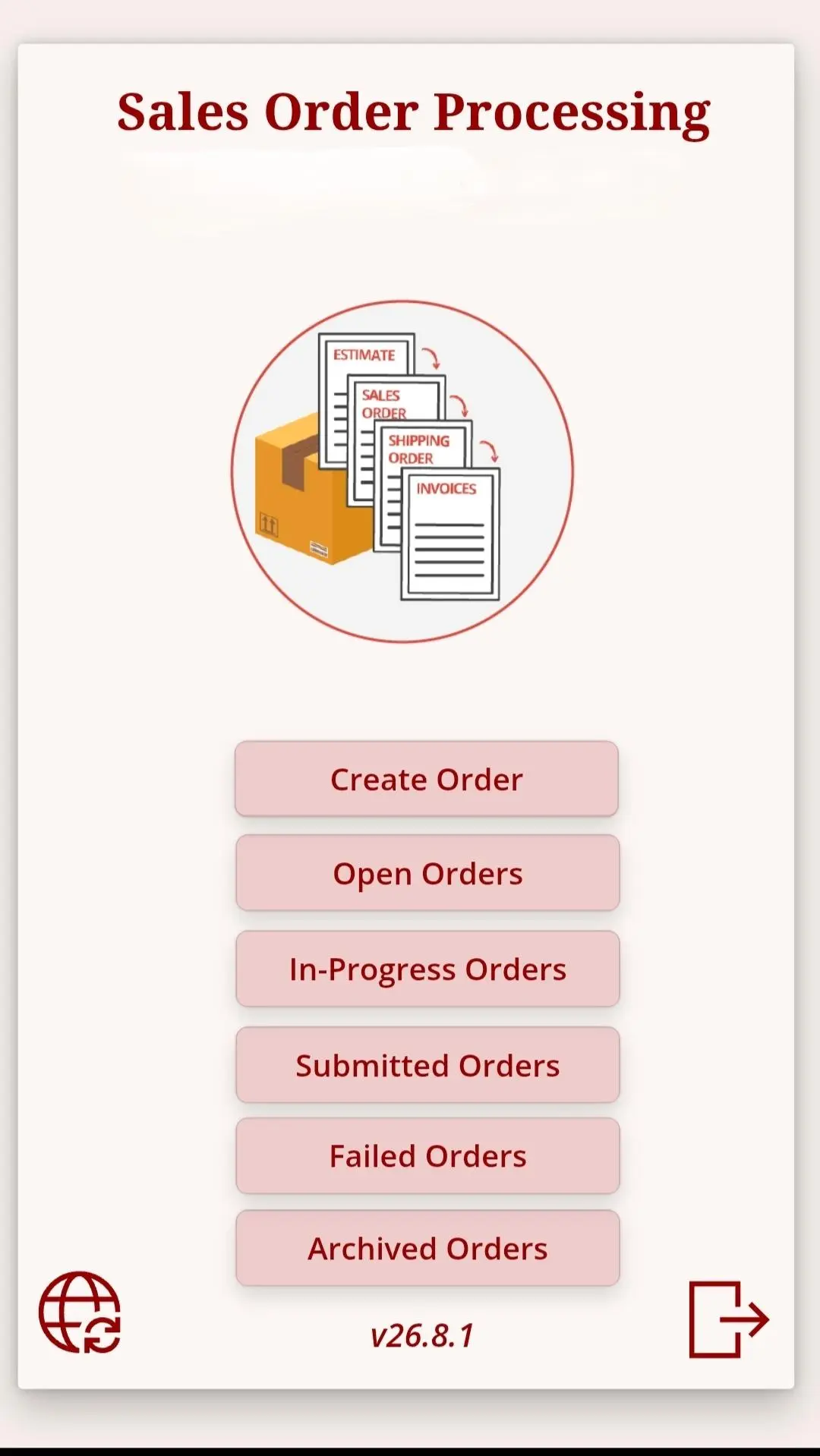
Central Sales Order Processing Hub - App Launch & Main Menu
🔍 Click to Zoom
Phase 01 • App Launch & Main Menu

Central Sales Order Processing Hub

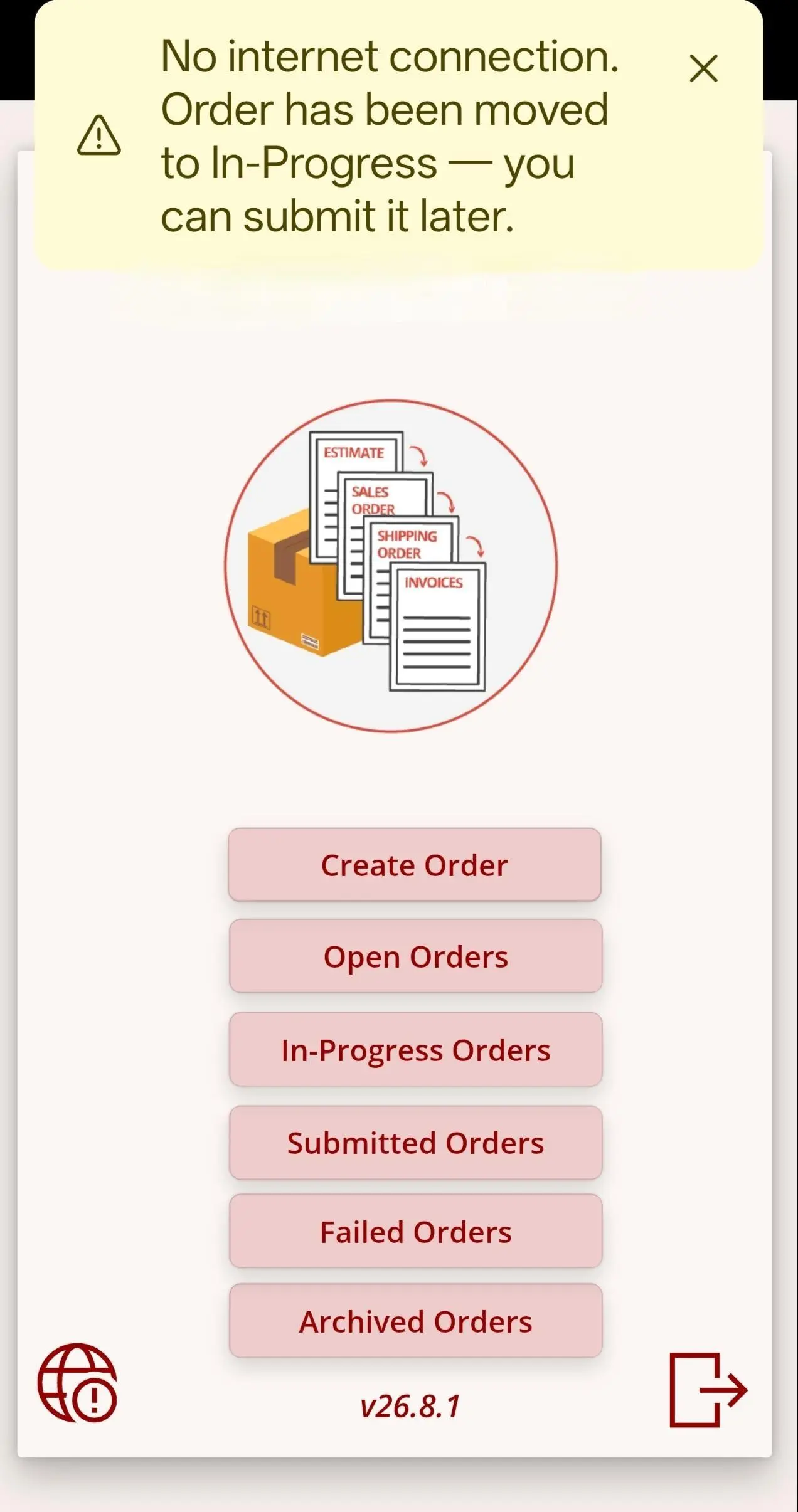
Touch-optimized mobile dashboard featuring full order lifecycle navigation, real-time connectivity telemetry, and release build tracking.

  • Direct access to 6 lifecycle queues: Create, Open, In-Progress, Submitted, Failed, and Archived.
  • Persistent connectivity telemetry: Globe indicator dynamically monitors online vs offline handshake status.
  • Release build governance (v26.8.1) ensuring standardized client-side business logic across fleet tablets.
  • Visual ERP progression pipeline: Estimate → Sales Order → Shipping Order → Invoices.
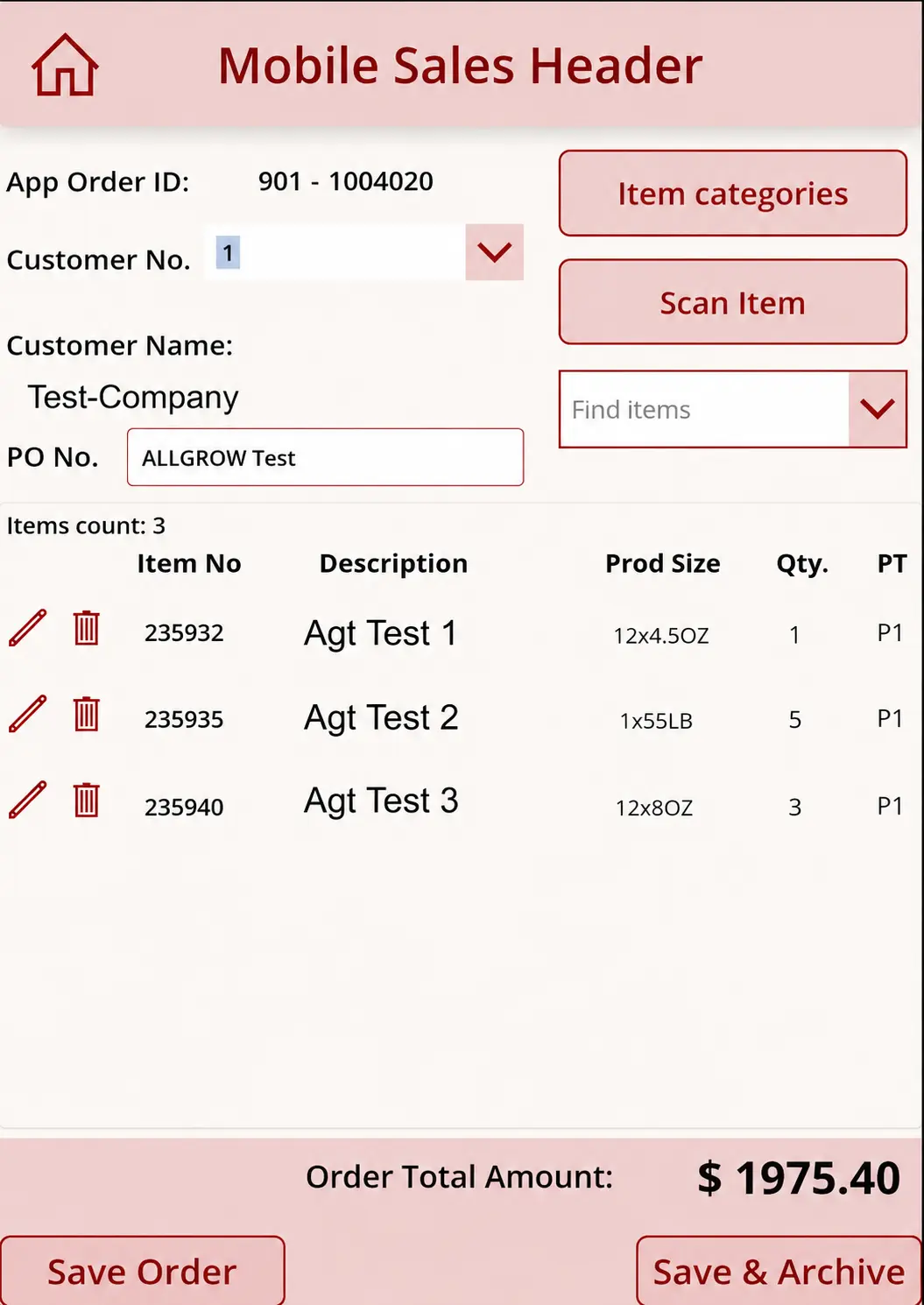
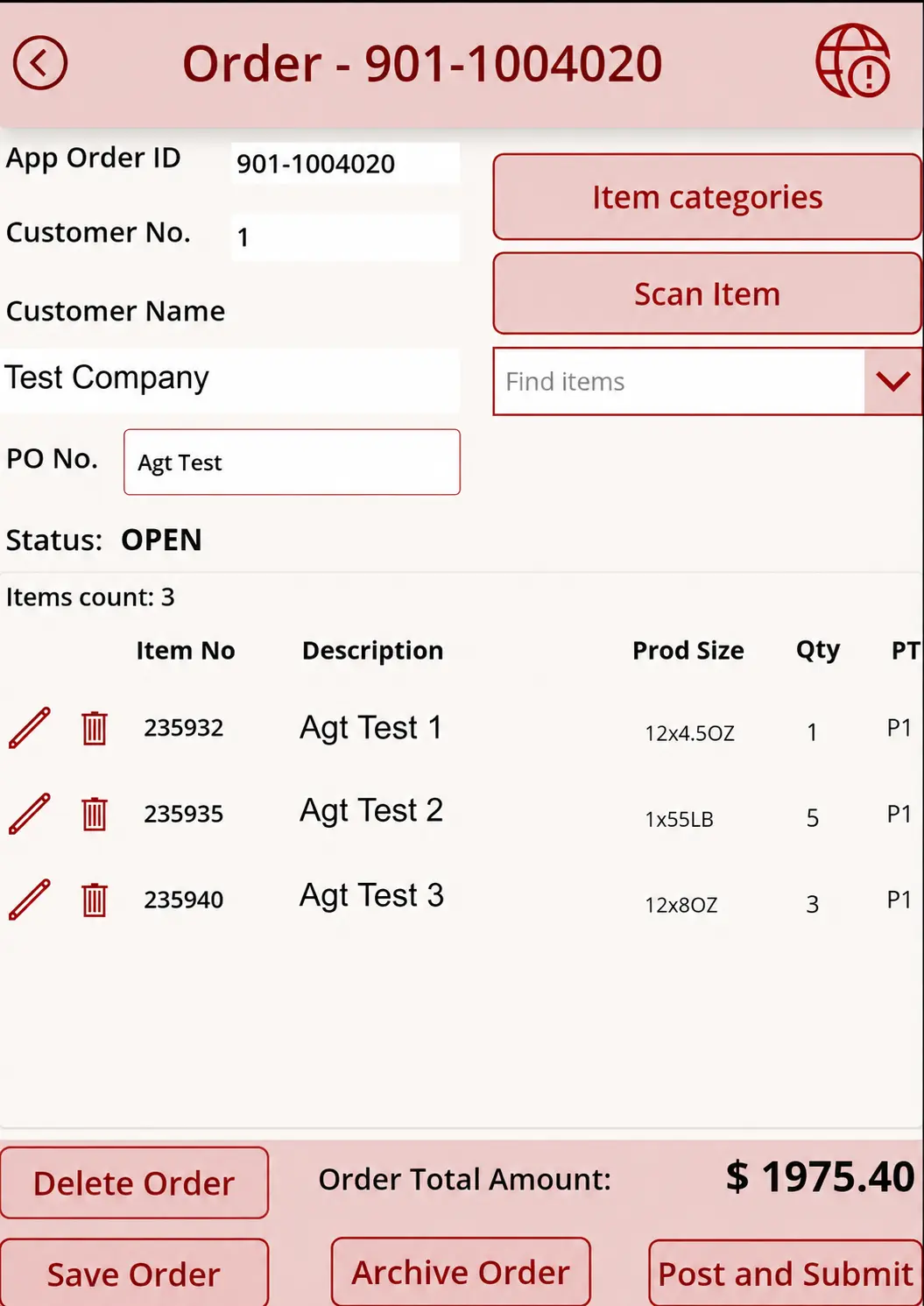
Mobile Sales Header & Rapid Line Item Entry - Line Composition & Barcode Scanning
🔍 Click to Zoom
Phase 01 • Line Composition & Barcode Scanning

Mobile Sales Header & Rapid Line Item Entry

Field rep order creation interface featuring customer lookup, category browsing, hardware barcode scanning, and multi-pack sizing.

  • Automated sequence generator issuing unique local Order IDs (e.g. 901-1004020) preventing concurrency collisions.
  • Integrated camera barcode / QR scanning (Scan Item) for rapid shelf inventory scanning without manual SKU typing.
  • Business Central item-card mapping: Preserves packaging specs (e.g. 12x4.5OZ, 1x55LB) and pricing tiers (PT P1).
  • Dual persistence controls: Save Order for active drafting, or Save & Archive for completed offline visits.
Order Modification & Post Execution Deck - Review & Commit Cockpit
🔍 Click to Zoom
Phase 01 • Review & Commit Cockpit

Order Modification & Post Execution Deck

Active order review console displaying real-time calculations, line deletion failsafes, and the primary Post and Submit command.

  • Real-time order subtotal aggregation ($1,975.40) reflecting local cached pricing schedules.
  • Header connectivity monitoring: Alert status icon flags degraded or absent cellular signals prior to submission.
  • Line-item CRUD controls: Inline line item editing and single-touch item deletion.
  • Multi-action dispatch: Flexible options to Delete, Save, Archive, or execute Post and Submit.
Intelligent Offline Interception & Toast Notification - Graceful Offline Handling
🔍 Click to Zoom
Phase 02 • Graceful Offline Handling

Intelligent Offline Interception & Toast Notification

Non-blocking offline interception banner triggered when submission is attempted in dead zones, automatically stashing the transaction.

  • Zero-crash exception interceptor: Catches network disconnects at submission time without halting the UI.
  • Automated state transition: Immediately redirects order into the In-Progress queue with non-destructive persistence.
  • Clear field notification: Displays floating toast informing the rep that the order has been moved to In-Progress.
  • Dynamic telemetry shift: The global sync icon in both header and footer updates to an alert state (!).
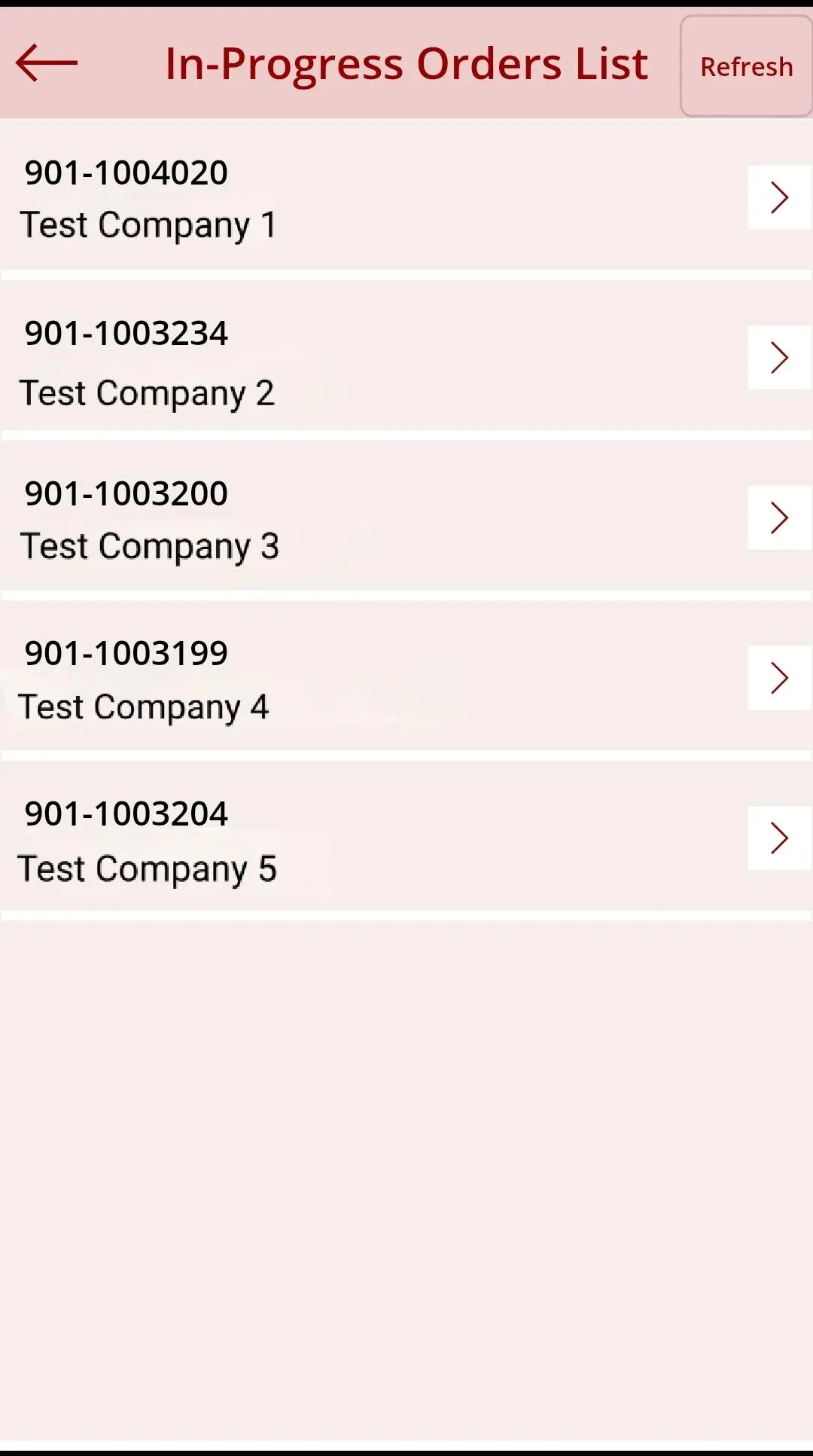
In-Progress Orders Queue & Sync Buffer - Local Offline Stash
🔍 Click to Zoom
Phase 02 • Local Offline Stash

In-Progress Orders Queue & Sync Buffer

Dedicated offline staging list containing all queued transactions ready for automatic or manual batch sync upon reconnection.

  • Local encrypted Dataverse/SQLite storage stashing full transaction payloads on the physical mobile device.
  • Multi-account order management: Reps can draft and store multiple customer orders (e.g. Test Company 1 through 5).
  • One-touch Refresh sync trigger: Instantly re-tests network availability and fires queued batch transmissions.
  • Drill-in order editing: Full capability to reopen, inspect, or append line items before committing to ERP.
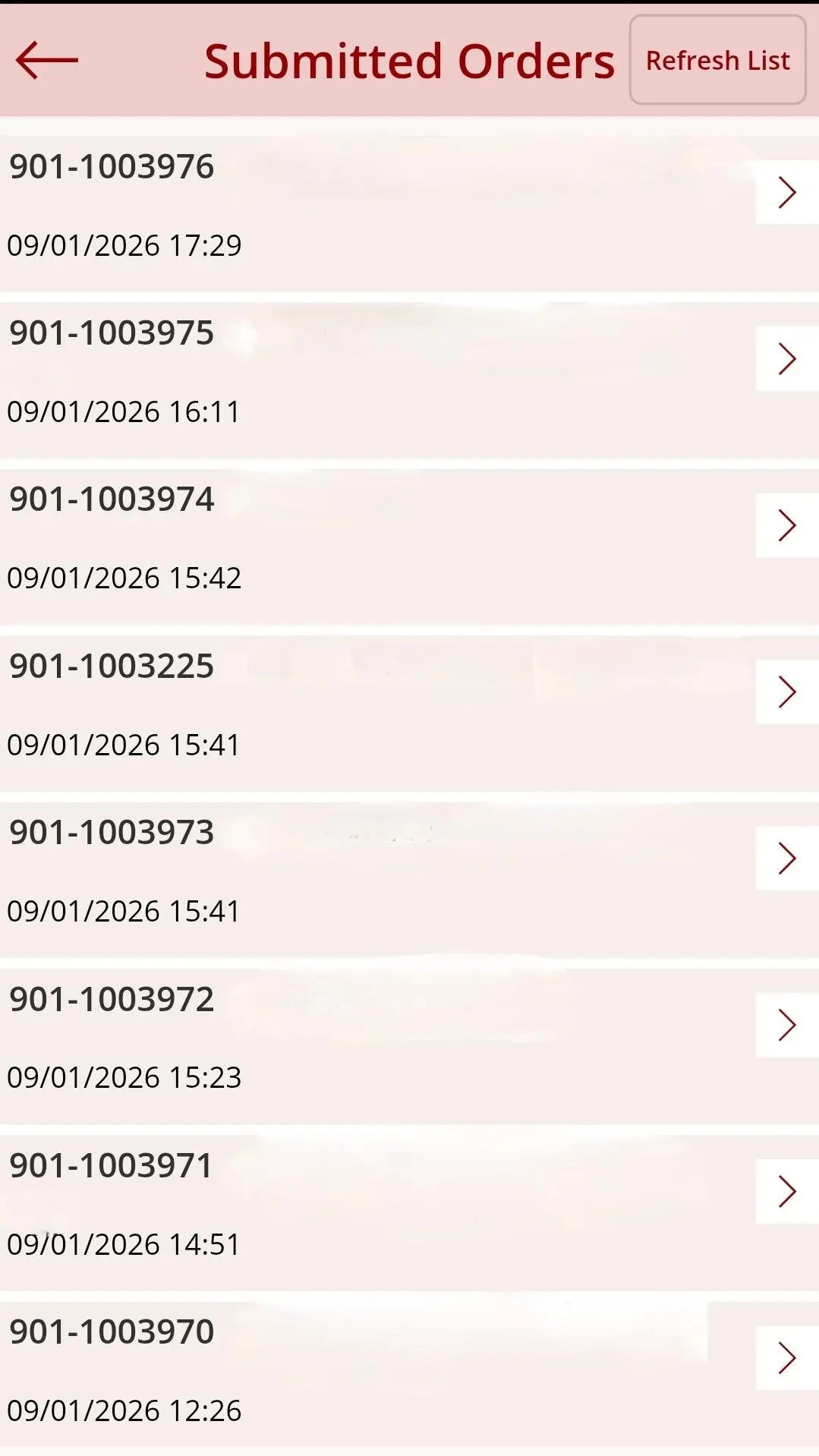
Confirmed Business Central Submission Ledger - Audit & Verification
🔍 Click to Zoom
Phase 03 • Audit & Verification

Confirmed Business Central Submission Ledger

Chronological audit trail displaying exact Business Central transmission timestamps, providing 100% field proof of posting.

  • Immutable timestamped confirmation log: Records exact submission moments (e.g. 09/01/2026 17:29, 16:11, 15:42).
  • Immediate warehouse release: Confirmed orders are instantly converted into Business Central sales orders for dispatch picking.
  • Full field accountability: Reps have verifiable proof that orders were received, eliminating lost orders.
  • Continuous background polling with manual Refresh List capability.
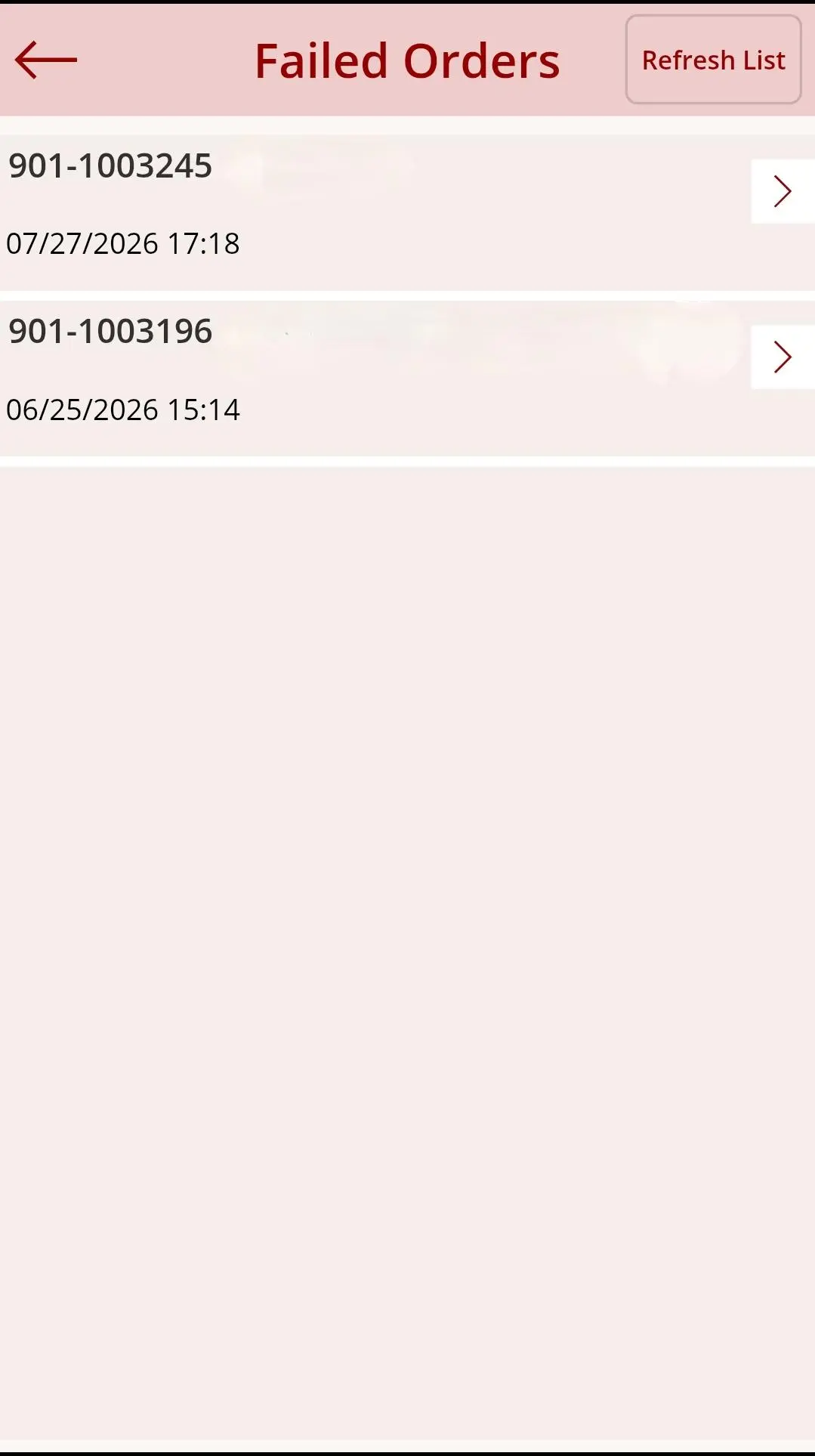
Exception Staging & Failed Orders Queue - Rejection Quarantine
🔍 Click to Zoom
Phase 03 • Rejection Quarantine

Exception Staging & Failed Orders Queue

Isolated triage queue capturing orders that triggered ERP validation errors, stopping database corruption while preventing lost data.

  • Non-destructive error isolation: Orders failing ERP schema checks are safely stashed rather than dropped.
  • Timestamped exception tracking: Reps can review rejected transactions chronologically (e.g. 901-1003245, 901-1003196).
  • Protection against ERP ledger pollution: Guarantees zero malformed or partial orders enter Business Central.
  • Independent field remediation: Reps can investigate and resolve issues without submitting helpdesk tickets.
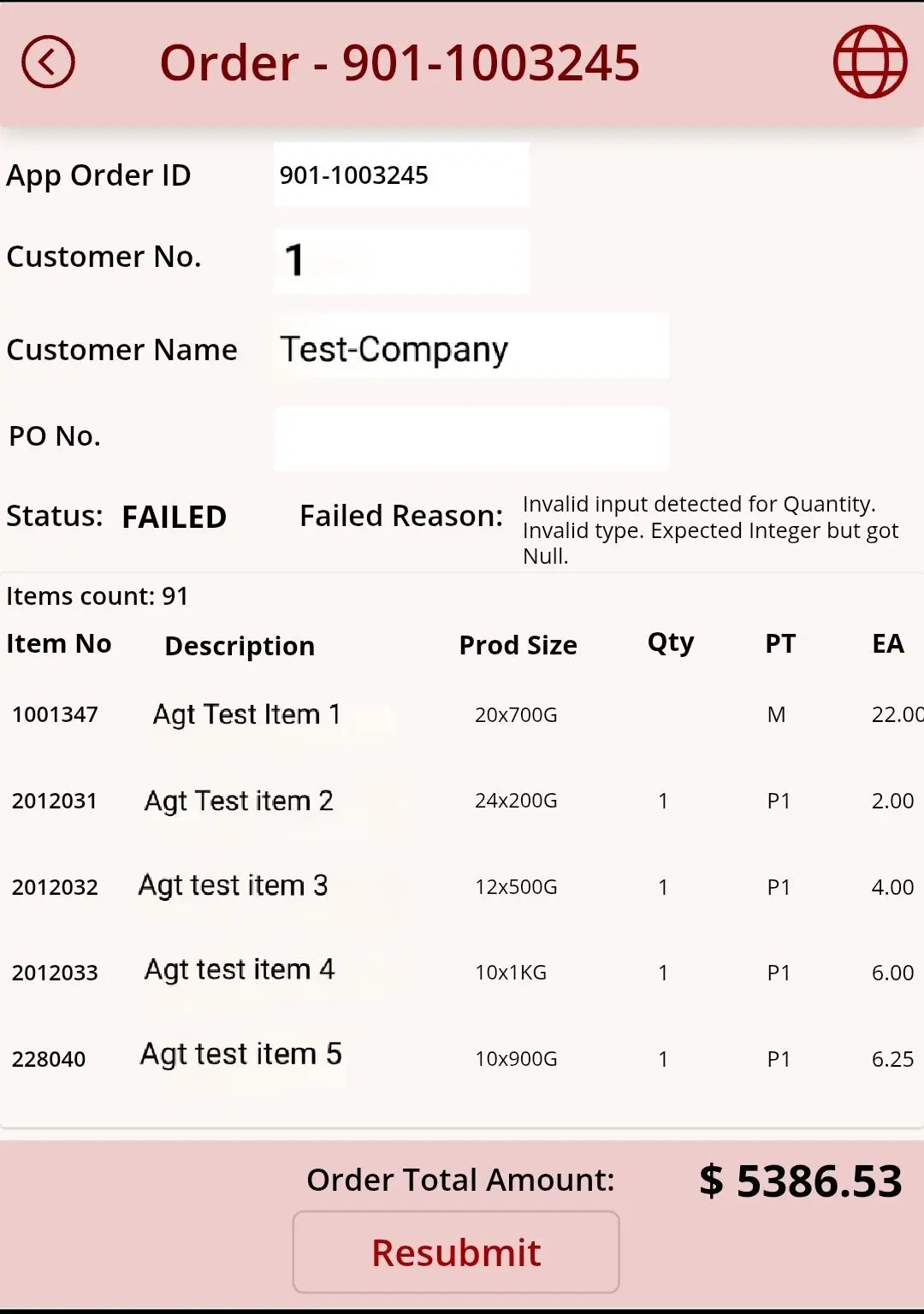
Diagnostic Attribution & 1-Tap Mobile Resubmit - Self-Healing Engine
🔍 Click to Zoom
Phase 03 • Self-Healing Engine

Diagnostic Attribution & 1-Tap Mobile Resubmit

Granular diagnostic drilldown pinpointing the exact ERP validation error on high-line bulk orders, with one-tap field resubmission.

  • Clear diagnostic messaging: Displays exact ERP failure reason (e.g. Invalid input detected for Quantity. Invalid type. Expected Integer but got Null).
  • Enterprise scale verified: Seamlessly renders 91-line bulk wholesale orders exceeding $5,386 in value.
  • Line-level error pinpointing: Highlights the exact item (1001347 - Agt Test Item 1) with missing quantity while preserving the other 90 valid lines.
  • One-touch Resubmit action: Rep enters the missing quantity and immediately posts back to Business Central in seconds.
🛡️

Why Offline Handshakes Require Pre-Posting Validation

In wholesale distribution, blind background syncing creates warehouse havoc: two reps in separate basements might book the last 10 cases of a product, or missing line quantities might crash the ERP posting routine. By combining non-destructive local stashing (In-Progress Queue) with automated pre-posting schema checks (catching null quantities, unit conversions, and credit holds before committing to Dynamics 365 Business Central), field teams retain total mobility without risking data corruption.

Deep Architecture

Three Architectural Pillars Behind Resilient Field Ordering

Engineering a high-adoption mobile experience requires bridging the gap between disconnected field tablets and strict ERP transaction boundaries.

Sync & Schema Protection

Dataverse Caching & Pre-Posting Handshake

When roaming into low-connectivity sites, the mobile app operates against local Dataverse/SQLite storage containing cached customer accounts, price tier tables (e.g. PT P1), and unit packaging specs.

Upon reconnection, before writing to Business Central ledgers, our validation engine intercepts input mismatches (such as integer vs null errors on quantities). Rather than crashing, errors are highlighted directly on device for immediate one-tap resubmission.

Dataverse Offline Profile Schema Interceptor Type-Safe Posting
Field Input Velocity

Camera Barcode Scan & 91+ Line Bulk Scaling

Wholesale distributors cannot rely on slow manual SKU entry. Reps leverage the integrated mobile camera scanner (Scan Item) or hierarchical category explorer to rapid-fire add products.

Production testing confirms zero memory bloat or UI freezes on bulk wholesale orders containing over 91 distinct line items totaling more than $5,380. Reps can switch between "Save Order" for open editing or "Save & Archive" for historical visit logging.

Hardware/Camera Scan 91-Line Bulk Orders Packaging Unit Logic
Executive Telemetry

Power BI Performance & Territory Governance

Connected to Business Central sales tables, an executive Power BI dashboard grants leadership instant macro visibility while strictly enforcing role-based territory privacy:

  • Rep Velocity Analytics: Tracks individual visit frequency, quotation conversions, and daily order values.
  • Territory Isolation: Reps access only their assigned customer accounts and personal order books.
  • Inventory Depletion Tracking: Real-time monitoring of submitted vs pending in-progress orders across regional warehouses.
Verified Business Outcomes

Measurable Field Sales Efficiency & Zero Admin Overhead

The solution eliminated administrative backlogs, empowered field reps with instant answers, and protected ERP inventory accuracy.

100% Field Uptime Sales representatives write and save orders with zero disruption in basements, cold storage rooms, and rural sites.
Zero Inventory Collisions Automated pre-posting stock validation ensures offline orders reflect live ERP availability without ledger locking.
91+ Line Bulk Capacity Verified real-world handling of large wholesale order payloads exceeding $5,300 without latency or browser crashes.
1-Tap Self-Healing Granular error attribution allows reps to fix missing line data in seconds and tap Resubmit without IT support tickets.

Equip Your Field Sales Teams with Connected Apps

Connect with Allgrow Technologies' Power Platform and Business Central architects to evaluate an offline-first mobile solution for your sales operations.

Book a Technical Consultation →