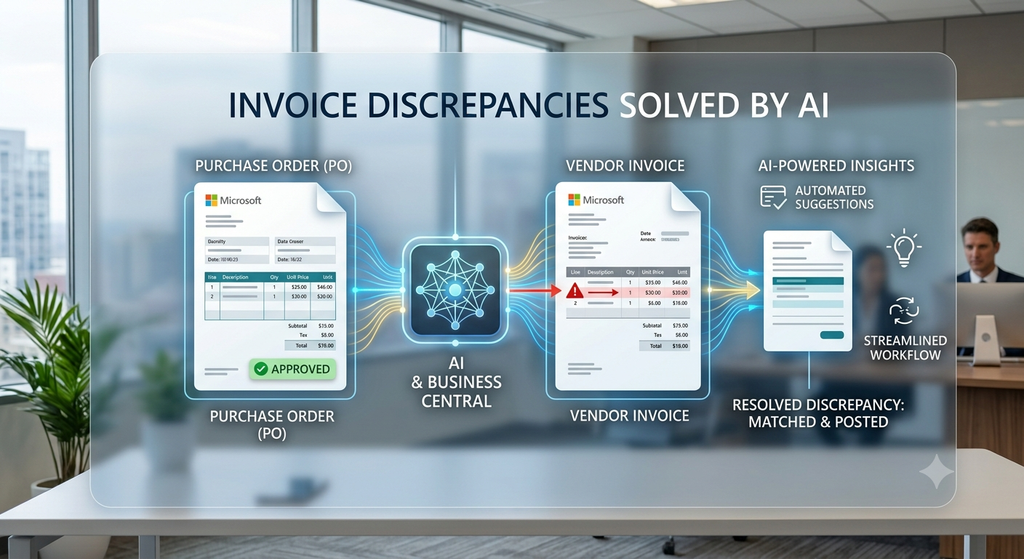
Every finance team has been there. A vendor invoice arrives for payment, but the amount does not match the purchase order. What begins as a small discrepancy can quickly snowball into approval delays, supplier disputes, and payment holds. This blog explores how Microsoft Dynamics 365 Business Central and AI help organizations automate invoice matching, improve accounts payable efficiency, and strengthen financial controls.
The Invoice That Stopped the Month-End Process
A Routine Invoice That Wasn’t So Routine
It was the final week of the month, and the finance department of a growing distribution company was preparing for month-end close. The team was focused on ensuring all invoices were processed and payments were scheduled on time.
Then a vendor invoice entered the Accounts Payable queue.
At first glance, nothing seemed unusual. The invoice referenced an approved purchase order, the supplier was familiar, and the goods had already been received. However, during the verification process, the AP executive noticed something concerning. The invoice reflected a higher quantity than what was originally ordered, and additional transportation charges had been added that were never approved during procurement.
What appeared to be a straightforward invoice suddenly became an exception case requiring investigation.
The Domino Effect of a Small Mismatch
The finance team couldn’t process the payment until the discrepancy was clarified. Procurement needed to verify the original purchase order. The warehouse team had to confirm what was actually received. The vendor insisted the invoice was correct. Before long, multiple departments were involved in resolving a single transaction.
For many organizations, this isn’t an unusual situation. As purchase volumes increase, invoice mismatches become more frequent and more difficult to manage. Small discrepancies can consume hours of employee time, slow down financial operations, and negatively impact supplier relationships.
The problem is rarely the mismatch itself. The problem is the lack of visibility and an efficient process to resolve it.
Why Vendor Invoice Mismatches Are a Growing Business Challenge
Organizations often underestimate the operational impact of invoice discrepancies. While finance teams may view them as accounting issues, mismatches affect almost every department involved in the procure-to-pay cycle.
When employees manually compare purchase orders, goods receipts, and vendor invoices, productivity declines. Approvals take longer. Payments get delayed. Vendors follow up repeatedly. Meanwhile, finance leaders struggle to gain visibility into outstanding liabilities and cash flow commitments.
As transaction volumes grow, manual invoice validation becomes increasingly difficult to sustain.
Common Types of Invoice Mismatches
| MISMATCH TYPE | EXAMPLE | BUSINESS IMPACT |
|---|---|---|
| Price Variance | PO shows ₹500/unit but invoice shows ₹550/unit | Payment delays and approval reviews |
| Quantity Variance | Ordered 100 units but invoiced 120 units | Additional verification required |
| Additional Charges | Freight or handling fees added later | Budget control concerns |
| Duplicate Invoice | Same invoice submitted twice | Risk of overpayment |
| Receipt Variance | Invoice quantity exceeds received quantity | Warehouse investigation required |
Without a structured invoice-matching process, these issues can quickly turn into operational bottlenecks.
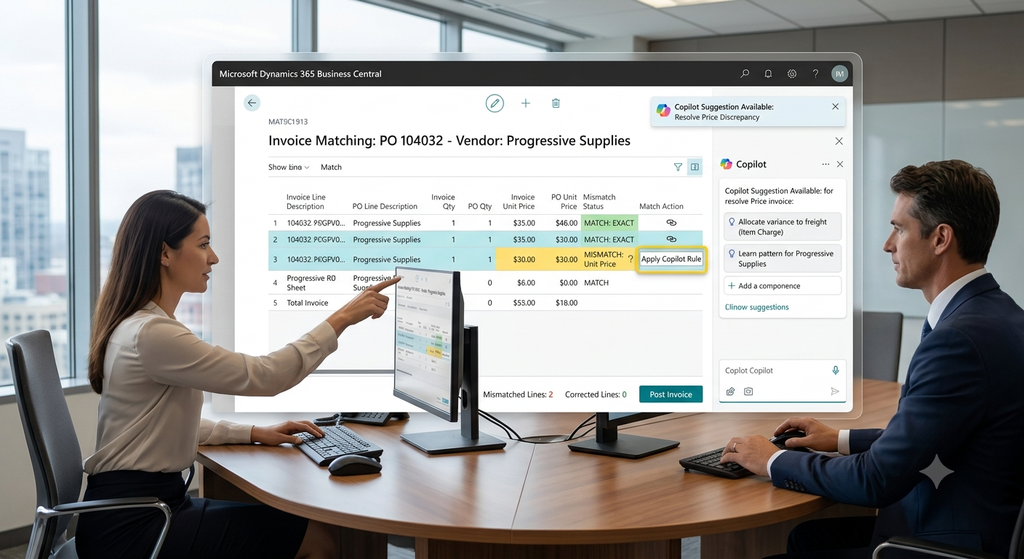
Dynamics 365 Business Central enables finance teams to compare purchase orders, receipts, and vendor invoices from a single interface.
How Dynamics 365 Business Central Handles Invoice Matching
One of the key strengths of Microsoft Dynamics 365 Business Central is its ability to maintain traceability throughout the entire procurement lifecycle.
Instead of relying on spreadsheets, email chains, or disconnected systems, every transaction remains connected from purchase order creation through invoice posting. This provides finance teams with a complete picture of what was ordered, what was received, and what is being invoiced.
Business Central supports a process known as Three-Way Matching, which compares:
When all three records align, the invoice can move forward confidently through the approval process.
How Three-Way Matching Works
Purchase Order Created
        │
        ▼
Goods Received
        │
        ▼
Vendor Invoice Received
        │
        ▼
Three-Way Matching Validation
        │
        ├── Match Found
        │      ▼
        │   Auto Approval
        │
        └── Mismatch Found
               ▼
        Exception Workflow
               ▼
        Review & Resolution
               ▼
          Invoice Posted
This structured approach significantly reduces the risk of overpayments, duplicate invoices, and procurement errors.
How AI-Powered Invoice Matching in Dynamics 365 Business Central Reduces Approval Delays
Although Dynamics 365 Business Central provides strong controls, finance teams often face another challenge: volume.
Reviewing hundreds or thousands of invoices every month manually is time-consuming. Not every discrepancy deserves the same level of attention, and this is where AI begins to deliver measurable value.
Traditional systems can tell you that a mismatch exists.
AI can help explain why.
By analyzing historical purchasing behavior, supplier trends, pricing patterns, and previous invoice activity, AI can identify unusual transactions and prioritize them for review. Instead of asking finance users to investigate every discrepancy equally, AI helps them focus on the exceptions that truly matter.
How AI Identifies Invoice Exceptions
Input:
  Purchase Order
  Goods Receipt
  Vendor Invoice

AI Analysis:
  - Compare Quantities
  - Compare Pricing
  - Review Additional Charges
  - Check Vendor History
  - Detect Unusual Patterns

Output:
  Risk Score: High
  Recommended Action: Finance Review
This transforms invoice processing from a reactive activity into a proactive one.
Instead of spending time looking for problems, finance teams can focus on making decisions.
Real-World Success Story: How Allgrow Helped Streamline Invoice Approvals
At Allgrow Technologies, we recently worked with a manufacturing organization that was struggling with invoice approval delays.
The company had already invested in ERP technology, yet its finance team was still handling invoice exceptions manually. Quantity variances, freight charges, and pricing differences frequently required multiple rounds of validation, creating delays across the accounts payable process.
After assessing the client’s procurement and finance workflows, we discovered that the issue wasn’t data availability. The required information was already present in the system. The challenge was the lack of automation and structured exception management.
Our consultants redesigned the approval process within Dynamics 365 Business Central, introducing customized workflows aligned with the client’s operational structure. Invoice exceptions were automatically categorized, routed to the appropriate stakeholders, and tracked through a transparent approval process.
The result was a more efficient and scalable accounts payable function. Finance users spent less time on manual validation, approvals moved faster, and management gained greater visibility into exception handling.
This is a scenario we frequently encounter. Many organizations already possess the information needed to manage invoice discrepancies effectively. The missing component is often the process design that transforms information into action.
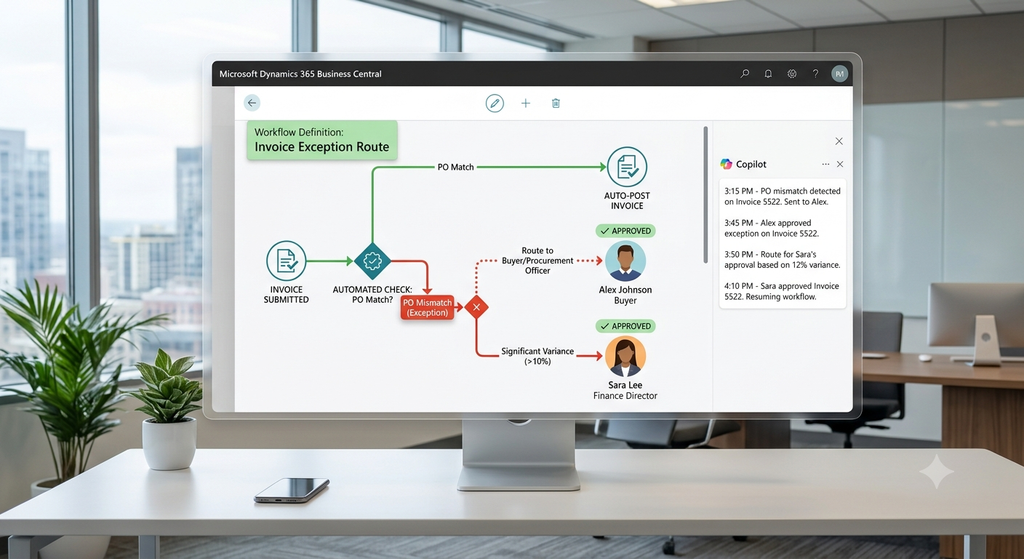
Automated workflows route invoice exceptions to the right approver, reducing reliance on emails and manual follow-ups.
Frequently Asked Question: What Happens When a Vendor Invoice Doesn’t Match a Purchase Order?
When a vendor invoice does not match a purchase order, organizations typically experience payment delays while finance teams investigate price differences, quantity variances, additional charges, or receipt discrepancies.
Using Dynamics 365 Business Central, businesses can identify these discrepancies through three-way matching and approval workflows. When AI capabilities are added to the process, organizations can also prioritize high-risk exceptions, identify unusual supplier behavior, and reduce the time required to resolve discrepancies.
The Future of Accounts Payable Is Intelligent
The future of invoice management isn’t simply about automation.
It’s about intelligent automation.
As AI capabilities continue to evolve, organizations will increasingly move from reactive exception handling to proactive risk management. Instead of discovering issues after invoices arrive, finance teams will gain insights into supplier performance, purchasing behavior, and emerging risks before they impact operations.
The combination of Dynamics 365 Business Central, AI-driven exception management, and automated workflows creates a finance function that is more accurate, efficient, and scalable.
Businesses that embrace intelligent accounts payable processes today will be better positioned to support growth tomorrow.
How Allgrow Can Help
Successfully implementing Microsoft Dynamics 365 Business Central is only the first step. The real value comes from aligning technology with business processes.
At Allgrow Technologies, we help organizations optimize procurement, accounts payable, inventory management, and financial operations through tailored Business Central implementations and customizations. Our consultants work closely with finance and operations teams to design practical solutions that improve efficiency without compromising governance.
Whether you’re struggling with vendor invoice matching, approval delays, manual exception handling, or fragmented procurement processes, our team can help you build a smarter and more scalable finance operation.
Final Thoughts
A vendor invoice that doesn’t match a purchase order may seem like a routine accounting issue, but the operational impact can be significant. Delayed payments, increased administrative effort, supplier disputes, and reduced visibility all stem from inefficient exception management.
Microsoft Dynamics 365 Business Central provides the foundation through powerful invoice matching and approval controls. AI enhances that foundation by helping organizations identify, prioritize, and resolve discrepancies faster than ever before.
Together, they enable businesses to transform invoice processing from a recurring operational headache into a streamlined, intelligent, and scalable process.
For organizations looking to modernize their procure-to-pay operations, reduce manual effort, and strengthen financial control, the combination of Business Central, AI, and expert guidance from Allgrow Technologies can deliver lasting results.