

1. The Operational Bottleneck of Legacy ERP Credit Holds
In high-volume B2B wholesale, distribution, and manufacturing enterprises across North America, order velocity directly dictates revenue realization. Yet in hundreds of mid-market organizations running legacy ERP configurations or unoptimized Microsoft Dynamics instances, the order-to-cash pipeline grinds to a dead halt the moment an order triggers a credit limit exception.
Traditional ERP credit management relies on rigid, monolithic behaviors: a sales order exceeds the customer's preset credit limit (e.g., $100,000 Net 30 terms) or flags an aging past-due invoice. The ERP sets an internal system block. What follows is manual friction:
- Ad-Hoc Email and Spreadsheet Chains: Sales representatives draft urgent emails to credit managers, copying regional VPs and customer success leads with manual screenshots of order headers.
- Blind Decision-Making: Approvers traveling or in meetings lack instant access to Dun & Bradstreet (D&B) risk scores, 12-month payment trends, or historical margin profitability without opening a full ERP client session.
- Audit Vulnerabilities: "Approved per phone conversation" or forwarded emails fail external SOX (Sarbanes-Oxley) compliance audits due to fragmented timestamps, missing segregation of duties (SoD), and non-standard audit trails.
- Fulfillment Deadlines Missed: By the time the credit manager reviews the account at end of day, distribution center cutoff times (e.g., 3:00 PM EST carrier freight pickups) have lapsed, delaying fulfillment by 24 to 48 hours.
Modernizing this workflow does not require a risky, multi-million-dollar core ERP overhaul. By deploying lightweight, governed Microsoft Power Platform solutions layered on top of Dynamics 365 Finance & Operations (F&O) or Dynamics 365 Business Central, enterprises can transform credit approvals into an automated, sub-minute, mobile-first experience.
2. Architectural Blueprint: Decoupled Workflow Layer
The architectural principle underpinning modern ERP modernization is decoupling business logic from transactional core storage. Instead of authoring brittle, deeply customized X++ or AL code inside the core ERP that breaks during bi-annual Microsoft One Version service updates, modern enterprises build modular workflows in Microsoft Power Platform.
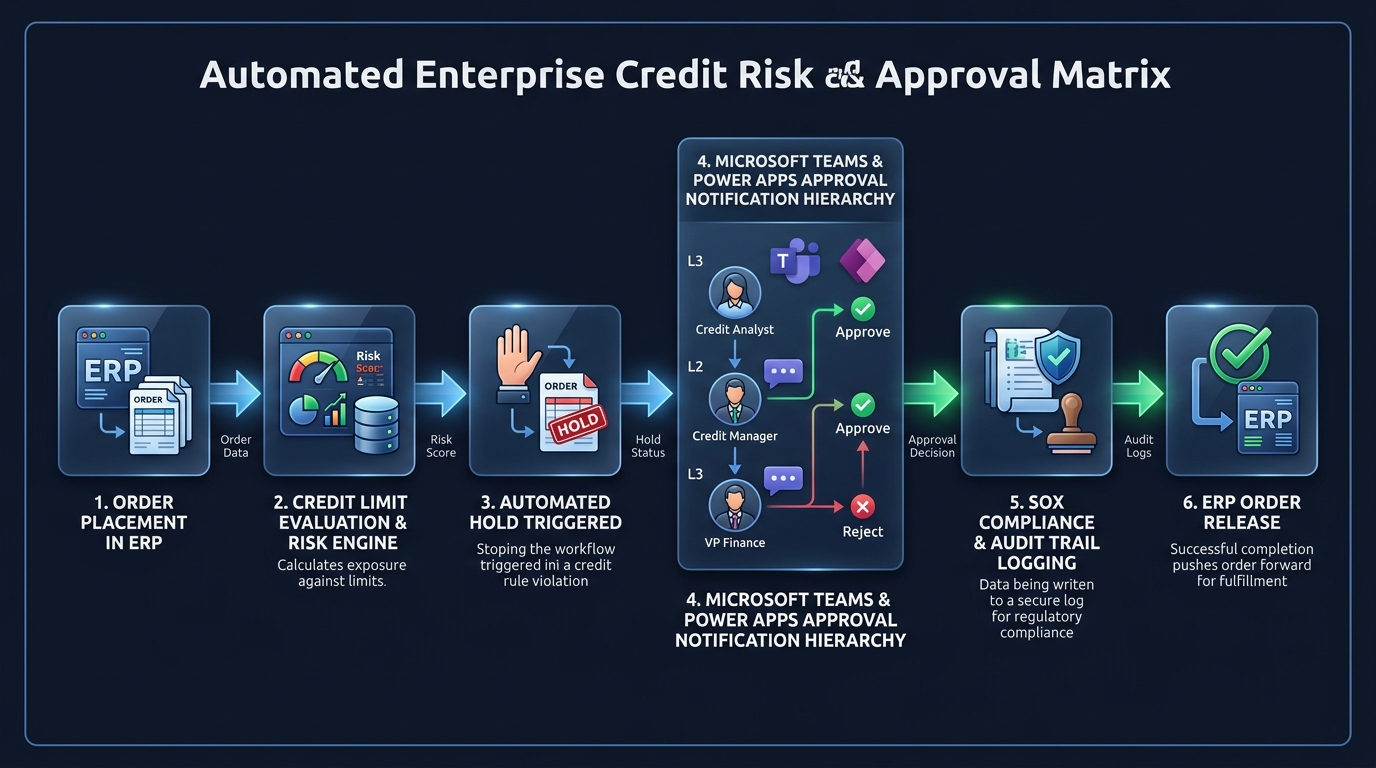
This architecture leverages three complementary Microsoft technologies:
- Dynamics 365 Business Events & Dataverse Virtual Tables: Exposes transactional sales orders and customer ledger balances directly into Dataverse without duplicative data replication. High-speed business events fire instantaneously when an order reaches a credit hold status.
- Microsoft Power Automate Cloud Flows: Serves as the real-time orchestration engine. It retrieves exposure metrics, calculates risk rules, coordinates parallel approval pathways, and records immutable transaction logs.
- Microsoft Teams Adaptive Cards & Power Apps Mobile: Delivers an intuitive, context-rich approval interface directly into the tool executives already live in every day, eliminating the need for approvers to possess full ERP user licensing or desktop VPN access.
Executing multi-tier approval polling and notification routing directly within core ERP application servers introduces thread contention during peak billing hours. Offloading workflow orchestration to Microsoft Power Automate cloud infrastructure ensures core ERP transaction processing retains sub-second database response times.
3. Workflow Mechanics: From Automated Hold to Multi-Tier Sign-Off
Let us trace the exact technical execution path of an enterprise sales order credit override workflow across a modern US distribution enterprise:
Sales Order Ingestion & Real-Time Balance Evaluation
An EDI 850 purchase order or customer service entry generates a Sales Order in Dynamics 365. The system calculates current customer financial exposure:
Total Financial Exposure = Open Invoices + Uninvoiced Order Backlog + Current Sales Order Total
If Total Exposure exceeds the approved Credit Limit or the customer has invoices exceeding 60 days past due, the order status changes to On Credit Hold, and an asynchronous Business Event fires to Power Automate.
Contextual Risk Enrichment & Dynamic Tier Routing
Power Automate intercepts the event and executes automated enrichment via secure REST APIs:
- Pulls 24-month payment performance history and Days Sales Outstanding (DSO) from the ERP.
- Calls external credit risk scoring APIs (e.g., Dun & Bradstreet, Experian Commercial) to verify creditworthiness.
- Calculates gross margin percentage for the held order lines to determine profitability value.
The flow then maps the request to the corporate financial approval matrix:
- Tier 1 (< $25,000 overage): Regional Credit Analyst sign-off required.
- Tier 2 ($25,000 – $100,000 overage): Credit Manager & Director of Sales dual approval.
- Tier 3 (> $100,000 overage or > 90 days past due): Corporate Controller or VP of Finance authorization required.
Microsoft Teams Adaptive Card Dispatch
The assigned financial controller receives a secure, actionable Adaptive Card within Microsoft Teams. The card presents:
• Customer Name, Account Number, and Payment Terms (e.g., Net 30).
• Order Dollar Value and Line Item Margin Breakdown.
• Existing AR Aging Balance ($ Current, 31–60, 61–90, 90+ days).
• One-touch actionable buttons: Approve with Comment, Request 50% Prepayment, or Reject Order.
ERP Order Release & Warehouse Notification
Upon verified controller sign-off, Power Automate writes back to Dynamics 365 via Dataverse Virtual Table connector, updating order status to Released to Warehouse. An automated alert pings the shipping dock supervisor, and the picking wave generates immediately. If rejected, the sales rep is notified with controller feedback, prompting terms renegotiation.
4. SOX Compliance, Segregation of Duties (SoD) & Audit Trails
For publicly traded US corporations and high-growth organizations preparing for IPO or institutional recapitalization, internal financial controls are paramount. Section 404 of the Sarbanes-Oxley (SOX) Act mandates verifiable, tamper-proof internal controls over financial reporting, specifically governing revenue recognition and credit authorization.
A primary vulnerability in legacy ERP environments is the circumvention of Segregation of Duties (SoD). For example, granting a sales operations manager permission to unblock orders in the ERP creates a major audit deficiency.
| Governance Pillar | Legacy ERP / Manual Email Workflow | Modern Power Platform & Dataverse Governance |
|---|---|---|
| Segregation of Duties (SoD) | High Risk Sales reps frequently hold ERP security rights to override holds. | Enforced Hard separation enforced via Entra ID (Azure AD) security roles. Sales roles cannot approve overrides. |
| Audit Trail Immutability | Fragile Approvals scattered across Outlook PSTs, informal Slack pings, or verbal sign-offs. | Airtight Every button click, comment, timestamp, and IP signature is logged in an encrypted Dataverse audit table. |
| Approval Delegation | Uncontrolled Forwarded emails bypass approval thresholds when managers are out of office. | Automated Formal out-of-office delegation rules reroute tasks to designated alternate approvers with audit record. |
| External Auditor Access | Costly Weeks of manual sampling, compiling screenshots, and reconciling paper forms. | Instant Read-only auditor Power BI dashboards displaying full approval history linked to GL transactions. |
5. Custom ERP Extensions vs. Power Platform Workflows
Historically, IT leadership debated whether to code custom approval workflows directly inside Dynamics 365 Finance & Operations using X++ development or build external tools. The shift toward Microsoft Power Platform has decisively resolved this debate for enterprise architects:
| Evaluation Dimension | Custom Code Inside Core ERP (X++ / AL) | Microsoft Power Platform + Power Automate |
|---|---|---|
| Deployment Timeline | 12 to 20 weeks of custom development, unit testing, and sandbox staging. | 3 to 5 weeks using pre-built connectors, templates, and Dataverse integration. |
| Licensing Cost | Every approver must possess a full Dynamics 365 ERP license ($180–$300/user/month). | Approvers use existing Microsoft 365 / Teams licenses or cost-effective Power Apps standalone licenses ($5/user/month). |
| Mobile Usability | Complex ERP mobile workspaces requiring constant VPN authentication. | Native Microsoft Teams push notifications and mobile-responsive Adaptive Cards accessible anywhere. |
| Maintenance & Upgrade Impact | Custom extensions risk merge conflicts and breaking during Microsoft One Version updates. | Zero technical debt on core ERP; cloud flows run outside core codebase via standard Microsoft APIs. |
| External System Extensibility | High-effort development required to connect third-party credit bureaus (D&B, Moody's, Experian). | Over 1,000+ out-of-the-box Power Platform connectors and custom REST API swagger integrations. |
6. Quantifiable Financial Impact for US Wholesale & Manufacturing
The business case for modernizing credit hold workflows extends beyond IT efficiency into direct balance sheet improvements:
- Accelerated Fulfillment Cycles: Order hold release turnaround drops from an average of 18 business hours to less than 45 minutes, safeguarding same-day shipping commitments for critical retail and industrial customers.
- Reduced Days Sales Outstanding (DSO): With automated visibility into past-due aging presented directly on every approval request, credit managers consistently condition approvals on partial payments, driving a 3 to 7 day drop in DSO within two quarters of go-live.
- Eliminated Unauthorized Bad Debt Write-Offs: Because no sales order exceeding limits can ship without multi-tier executive sign-off, unvetted credit extensions are eliminated, reducing year-end bad debt provisions by up to 22%.
- License Optimization: C-suite executives, regional sales directors, and credit analysts no longer require full ERP user licenses solely to approve pending sales transactions, yielding substantial recurring annual software savings.
7. 4-Phase Rollout Blueprint & Governance Roadmap
Deploying an enterprise credit approval solution requires strict change management and architecture discipline. Allgrow Technologies follows a structured 4-phase rollout methodology:
Codify the organization's credit approval threshold tiers, DOA (Delegation of Authority) policy, and multi-currency exchange handling. Define Dataverse tables for audit logging and configure Virtual Table connections to Dynamics 365 sales orders and customer balances.
Build real-time trigger flows listening to ERP business events. Construct dynamic Teams Adaptive Cards displaying real-time customer aging, credit exposure, and margin metrics. Establish escalation triggers for unresponded requests (e.g., auto-escalate to VP Finance after 4 hours).
Conduct exhaustive user acceptance testing (UAT) with credit controllers, regional sales heads, and internal audit staff. Validate role-based security boundaries in Microsoft Entra ID and run mock auditor sampling reports verifying 100% audit trail completeness.
Deploy to production using Power Platform Pipelines and solution packages (ALM). Transition operations to your internal team backed by Allgrow's 24/7 SLA enterprise support and established Power Platform Center of Excellence (CoE) guardrails.
8. Frequently Asked Questions
How does Power Automate trigger an automated credit hold when an ERP sales order exceeds limits?
Using Dataverse Virtual Tables or native Dynamics 365 Business Events, Power Automate listens for Sales Order creation or modification events. The flow computes total exposure (open invoices plus unbilled order backlog) against the customer's credit limit. If exposure exceeds limits, the ERP order status is instantly toggled to Credit Hold and an Adaptive Card approval is dispatched to the credit committee.
Does using Power Apps and Power Automate comply with SOX Segregation of Duties (SoD)?
Yes. Microsoft Power Platform enforces role-based access control (RBAC), Entra ID authentication, and immutable audit logs within Microsoft Dataverse. Sales reps cannot approve credit overrides for their own accounts, and all approval or rejection actions capture full user identity, timestamp, decision rationale, and financial exposure state for external audit inspection.
Can credit approvals be completed directly inside Microsoft Teams and mobile devices?
Yes. Microsoft Power Automate sends interactive Adaptive Cards to designated approvers directly within Microsoft Teams and the Power Apps Mobile application. Financial controllers can review past payment aging, D&B scores, and line-item margins, and submit one-click approval or rejection comments without logging into the ERP.
How does this solution prevent ERP performance degradation during high order volume peaks?
Modern architectures decouple approval workflows using asynchronous messaging patterns such as Azure Service Bus queues or Dataverse asynchronous business events. The transactional ERP core remains lightweight and responsive while Power Automate orchestrates notifications and state updates independently.