
Building a modern multi-vendor marketplace is often framed as a frontend e-commerce challenge: spinning up merchant storefronts, displaying seller profiles, and handling cart checkout. But for mid-market distributors, manufacturing networks, and retail brands scaling past tens of thousands of SKUs, the storefront is merely the tip of the iceberg.
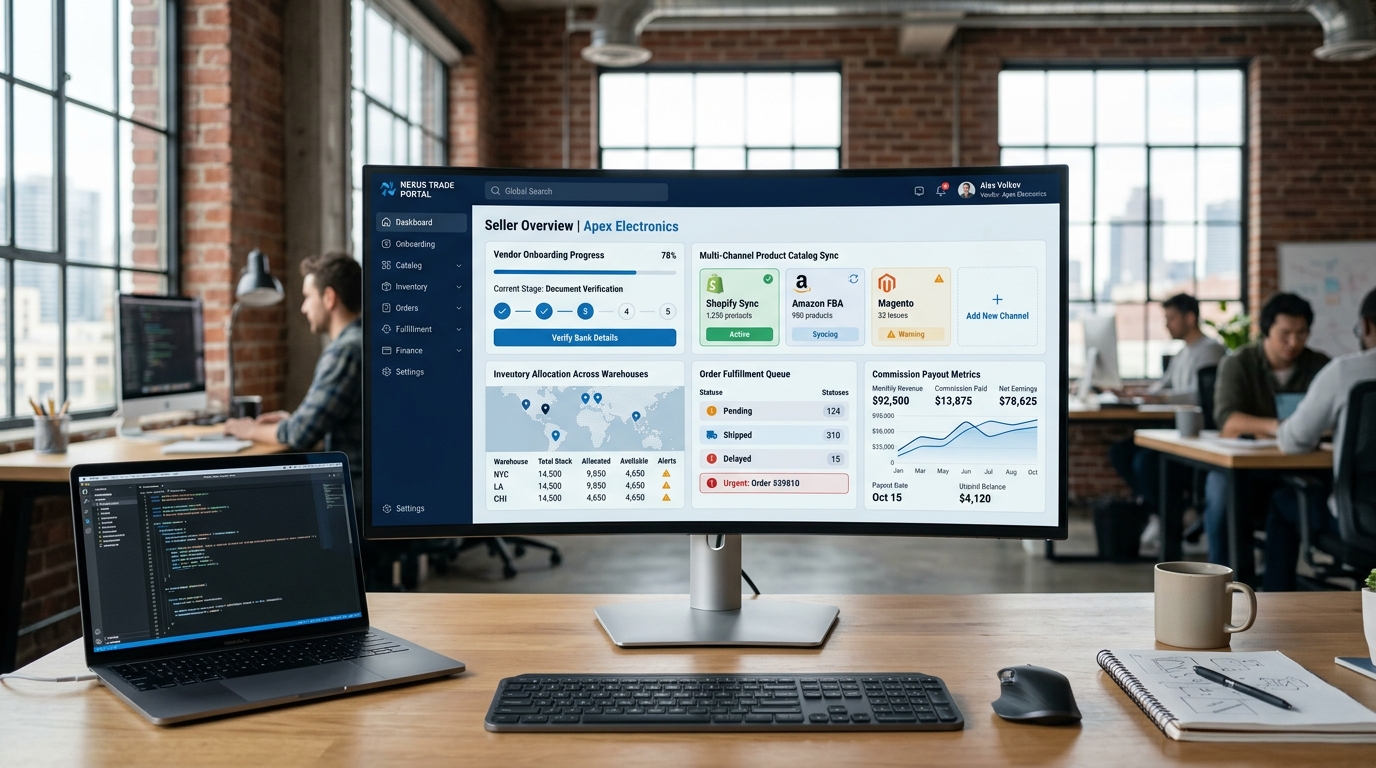
The true operational barrier is the back-office: how split orders fragment across distinct supplier warehouses, how commission escrow settles into financial ledgers, how inventory remains synchronized in real-time, and how corporate governance is maintained inside enterprise ERP and CRM systems.
When mid-market enterprises rely on off-the-shelf marketplace extensions (such as standard WooCommerce marketplace plugins or basic Shopify apps), they inevitably hit a scaling ceiling around 50 to 100 active vendors. Database table locks occur during concurrent checkout bursts, split-payment reconciliations require manual spreadsheets, and accounting teams spend weeks attempting to reconcile vendor accounts payable against Stripe or bank disbursements.
In this comprehensive architectural guide, we break down how to design a high-throughput, enterprise-grade multi-vendor platform from the ground up: coupling a composable custom software core with Microsoft Dynamics 365 Business Central for financial ledger automation and Dynamics 365 CRM for merchant lifecycle management.

1. The Architecture of a Composable Multi-Vendor Core
A scalable multi-vendor marketplace cannot be built as a monolithic database application where vendors, customers, products, and general ledger postings compete for the same row locks. Instead, modern enterprise platforms rely on an event-driven, composable architecture.
In this architecture, four primary tiers operate independently, communicating via asynchronous message buses and resilient REST/GraphQL APIs:
┌────────────────────────────────────────────────────────────────────────┐
│                        COMPOSABLE FRONTEND LAYER                       │
│      Headless Buyer Storefront (Next.js / React Server Components)      │
│      Distributed Multi-Tenant Seller Portal (Vite / React / Tailwind)  │
└───────────────────────────────────┬────────────────────────────────────┘
                                    │ GraphQL / REST
┌───────────────────────────────────▼────────────────────────────────────┐
│                    API GATEWAY & SERVICE ORCHESTRATION                  │
│       Rate Limiting • JWT Auth • Vendor Tenant Routing • Cache CDN     │
└───────────────────────────────────┬────────────────────────────────────┘
                                    │ Events (Kafka / Azure Event Grid)
┌───────────────────────────────────▼────────────────────────────────────┐
│                   MARKETPLACE DOMAIN MICROSERVICES                     │
│  ┌──────────────────┐  ┌──────────────────┐  ┌──────────────────────┐  │
│  │ Catalog & Search │  │ Split-Order State│  │ Commission & Escrow  │  │
│  │ (Elasticsearch)  │  │ Engine (Node/Go) │  │ Service (PostgreSQL) │  │
│  └──────────────────┘  └──────────────────┘  └──────────────────────┘  │
└───────────────────────────────────┬────────────────────────────────────┘
                                    │ Webhooks / OData v4 / Service Bus
┌───────────────────────────────────▼────────────────────────────────────┐
│                 ENTERPRISE BACK-OFFICE & GOVERNANCE LAYER               │
│  ┌───────────────────────────────────┐  ┌───────────────────────────┐  │
│  │ Dynamics 365 Business Central ERP │  │ Dynamics 365 CRM / Sales  │  │
│  │ • Vendor AP & Split Purchase Docs │  │ • Merchant Onboarding/KYC │  │
│  │ • Multi-Warehouse Inventory Sync  │  │ • B2B Credit Limit Checks │  │
│  │ • General Ledger Payout Remittance│  │ • Tiered Contract Pricing │  │
│  └───────────────────────────────────┘  └───────────────────────────┘  │
└────────────────────────────────────────────────────────────────────────┘
Why Custom Development Outperforms Monolithic Off-The-Shelf Plugins
When evaluating custom software development against SaaS or plugin marketplaces, mid-market enterprises encounter fundamental operational divergence:
| Capability | SaaS / Monolithic Marketplace Plugins | Custom Composable Marketplace Architecture |
|---|---|---|
| Concurrent Checkout Scale | Severe database bottlenecks; table locks on shared MySQL wp_posts or monolithic relational schemas. |
Horizontally autoscaling stateless services; Redis caching and event queue decoupling. |
| Catalog & Variant Limits | Struggles past 25,000 SKUs; slow faceted search and facet query degradation. | Dedicated search engine (Elasticsearch / Typesense) delivering sub-50ms queries across millions of SKUs. |
| Vendor Ledger Reconciliation | Basic CSV exports; manual journal entries required for refunds, returns, and withholdings. | Native automated API sync directly into Business Central Purchase Invoices and Vendor Sub-Ledgers. |
| B2B Trade & Credit Limits | Limited to credit cards and simple PayPal/Stripe splits; no Net-30 or credit terms. | Real-time credit ceiling validation against Dynamics 365 CRM before order release. |
| IP & Infrastructure Ownership | Locked into proprietary closed ecosystems with escalating transaction fees (1% - 3%). | 100% proprietary code ownership with zero GMV transaction penalties. |
2. The Core Challenge: Split-Order Orchestration
In a multi-vendor marketplace, a single customer transaction rarely corresponds to a single fulfillment journey. A typical customer cart might contain:
- Item A from Vendor 101 (California Warehouse)
- Item B from Vendor 204 (Ohio Fulfillment Center)
- Item C from Vendor 310 (Dropshipper in Florida)
From the customer's perspective, they swipe their card once, pay a single total amount, and expect a unified confirmation. But under the hood, the system must execute an intricate orchestration sequence:
1. Dynamic Shipping Rate Aggregation
Each vendor may have unique shipping carriers, origin postal codes, packaging dimensions, and freight SLAs. The custom checkout service calls vendor shipping engines in parallel via distributed worker threads, aggregating rates into a consolidated shipping fee or allowing item-level shipping selection without slowing down checkout latency.
2. Multi-Jurisdiction Sales Tax Nexus Calculation
Under US Marketplace Facilitator laws, the marketplace operator is typically responsible for calculating, collecting, and remitting sales tax on behalf of third-party sellers. The split-order engine integrates with automated tax calculation APIs (such as Avalara AvaTax or Vertex), decomposing tax line items by seller origin and buyer destination before generating accounting records.
3. Atomic Order Splitting & State Machine Management
If Vendor A accepts and ships their portion of the order immediately, but Vendor B experiences a backorder or inventory stockout, the system cannot hold the entire order in limbo. An event-driven state machine assigns each split-child order its own independent fulfillment lifecycle:
Parent Order: #ORD-98214 (Total: $840.00 | Paid via Stripe)
  ├── Sub-Order: #ORD-98214-A (Vendor 101 | $320.00 | Status: SHIPPED | Carrier: FedEx 782194)
  ├── Sub-Order: #ORD-98214-B (Vendor 204 | $410.00 | Status: PROCESSING | Carrier: Pending)
  └── Sub-Order: #ORD-98214-C (Vendor 310 | $110.00 | Status: DELIVERED | Carrier: UPS 1Z9928)

3. Connecting to the ERP Backbone: Microsoft Dynamics 365 Business Central
Here is where standard software development agencies fail: they connect the marketplace frontend to a payment gateway, but leave finance teams to manually enter vendor settlements into their accounting software.
In a mature enterprise deployment engineered by Allgrow's Business Central architects, the marketplace connects directly to Dynamics 365 Business Central via standard OData v4 and custom AL API endpoints.
The Automated ERP Financial Flow
- Customer Payment Intake: When the customer pays $1,000 on the marketplace storefront, an automated Cash Receipt Journal entry posts to Business Central, debiting the Gateway Clearing Account and crediting Customer Accounts Receivable.
- Automated Vendor Purchase Order Generation: For each vendor component in the split order, Business Central generates an unposted Purchase Order naming that specific vendor record.
- Platform Commission Withholding: The custom AL integration calculates the agreed marketplace commission (e.g., 15%) and applies a discount or deduction line item, ensuring the net Accounts Payable balance exactly equals the vendor's payout entitlement ($850).
- Warehouse Dispatch & Drop-Shipment: When the seller enters tracking data into the Seller Portal, a webhook posts the receipt and shipment in Business Central, moving inventory out of virtual vendor bins without manual intervention.
Production AL Code: Event-Driven Split Order Ingestion Handler
Below is an architectural example of a custom Business Central codeunit designed to ingest marketplace split-order payloads and post vendor purchase invoices automatically:
codeunit 50140 "ALGT Marketplace Split Order"
{
    Access = Internal;
    Subtype = Normal;

    procedure ProcessMarketplaceSubOrder(
        ParentOrderNo: Code[30];
        SubOrderNo: Code[30];
        VendorNo: Code[20];
        GrossAmount: Decimal;
        CommissionRate: Decimal;
        ItemNo: Code[20];
        Quantity: Decimal;
        UnitCost: Decimal
    ): Code[20]
    var
        PurchHeader: Record "Purchase Header";
        PurchLine: Record "Purchase Line";
        LineNo: Integer;
        NetPayable: Decimal;
    begin
        // Initialize Purchase Invoice for Marketplace Vendor
        PurchHeader.Init();
        PurchHeader."Document Type" := PurchHeader."Document Type"::Invoice;
        PurchHeader."No." := '';
        PurchHeader.Insert(true);

        PurchHeader.Validate("Buy-from Vendor No.", VendorNo);
        PurchHeader.Validate("Posting Date", WorkDate());
        PurchHeader.Validate("Document Date", WorkDate());
        PurchHeader."Vendor Invoice No." := SubOrderNo;
        PurchHeader."Posting Description" := StrSubstNo('Marketplace Payout Sub-Order %1 (Parent %2)', SubOrderNo, ParentOrderNo);
        PurchHeader.Modify(true);

        // Line 1: Item Inventory Allocation
        LineNo := 10000;
        PurchLine.Init();
        PurchLine."Document Type" := PurchHeader."Document Type";
        PurchLine."Document No." := PurchHeader."No.";
        PurchLine."Line No." := LineNo;
        PurchLine.Type := PurchLine.Type::Item;
        PurchLine.Validate("No.", ItemNo);
        PurchLine.Validate(Quantity, Quantity);
        PurchLine.Validate("Direct Unit Cost", UnitCost);
        PurchLine.Insert(true);

        // Line 2: Marketplace Commission Holdback (GL Account Credit Deduction)
        if CommissionRate > 0 then begin
            LineNo += 10000;
            PurchLine.Init();
            PurchLine."Document Type" := PurchHeader."Document Type";
            PurchLine."Document No." := PurchHeader."No.";
            PurchLine."Line No." := LineNo;
            PurchLine.Type := PurchLine.Type::"G/L Account";
            PurchLine.Validate("No.", '40500'); // Marketplace Commission Income Account
            PurchLine.Validate(Quantity, 1);
            PurchLine.Validate("Direct Unit Cost", -(GrossAmount * (CommissionRate / 100)));
            PurchLine.Insert(true);
        end;

        exit(PurchHeader."No.");
    end;
}
💡 Proactive ERP Governance Tip
Never execute synchronous direct-to-database writes from the public web checkout into Business Central. Always route transactions through an enterprise queue (such as Azure Service Bus or RabbitMQ) with a dead-letter queue. This guarantees that temporary ERP scheduled maintenance or Microsoft Wave update restarts never cause an abandoned cart or lost order.

4. Orchestrating B2B Customer & Merchant Lifecycles in CRM
While the ERP manages numbers, inventory, and remittances, Microsoft Dynamics 365 CRM serves as the operational command center for merchant onboarding, compliance, and customer relationship management.
1. Merchant Onboarding & KYC Verification
High-quality marketplaces require strict supplier governance. When a new vendor applies through the Seller Portal:
- A Vendor Onboarding Lead is automatically spawned in Dynamics 365 Sales.
- Automated business registration (EIN/TIN) and banking compliance checks (Plaid / Stripe Identity) trigger via Power Automate workflows.
- Certificate of Insurance (COI) and vendor agreement contracts are stored directly in Dataverse with automated renewal reminders.
2. B2B Corporate Credit Ceilings & Net-30 Terms
In B2B wholesale marketplaces, corporate buyers do not pay via credit card on every checkout; they purchase against authorized corporate credit lines. Integrating the custom marketplace checkout with Dynamics 365 CRM allows real-time credit checks:
- When Buyer Corp attempts a $45,000 order across 4 suppliers, the checkout engine queries Dynamics 365 CRM for available credit balance.
- If within limits, the order is approved instantly, creating an open accounts receivable entry.
- If the order exceeds the credit ceiling, an automated approval request triggers directly to the finance credit team via Teams Adaptive Cards.
3. Negotiated Contract Pricing Across Multiple Sellers
B2B buyers frequently negotiate custom discount pricing across specific manufacturer catalogs. By synchronizing Dynamics 365 Price Lists and Discount Matrixes into the marketplace cache, logged-in corporate buyers automatically see their negotiated contract rates, while retail guests see standard MSRP pricing.
5. Recommended Technology Stack for Enterprise Scale
To achieve sub-second catalog navigation, 99.99% uptime during holiday traffic spikes, and seamless ERP data flow, our engineering practice recommends the following composable architecture:
- Buyer Storefront & Seller Portals: Next.js 15+ / React Server Components, Tailwind CSS, TypeScript, hosted on Vercel or Azure Container Apps.
- Backend API & Microservices: Node.js / Go / Python FastAPIs deployed across containerized Kubernetes clusters.
- Search & Catalog Cache: Elasticsearch or Typesense paired with Redis cluster for lightning-fast faceted catalog filtering.
- Asynchronous Event Pipeline: Azure Service Bus, Apache Kafka, or Azure Event Grid for event-driven decoupled messaging.
- Payment & Seller Payouts: Stripe Connect, Adyen for Platforms, or custom escrow ledger with automated bank ACH routing.
- Core ERP: Microsoft Dynamics 365 Business Central for automated vendor purchase orders, warehouse bins, and AP ledger reconciliation.
- CRM & Buyer Governance: Microsoft Dynamics 365 Sales & Customer Insights for buyer credit ceilings, merchant KYC, and contract pricing.